DO-254 (also known as ED-80, “Design Assurance Guidance for Airborne Electronic Hardware”) is the primary international guidance used for developing complex, safety-critical electronic hardware for civil aircraft. It was jointly developed by RTCA (US) and EUROCAE (EU). First published in 2000, DO-254 became widely adopted in the avionics industry after the FAA accepted it as a means of compliance for avionics design assurance.
In 2010, the DO-254 Users Group published a paper “Best Practice VHDL Coding Standards for DO-254 Programs” , a collection of generally accepted coding guidelines aimed at improving design robustness and reviewability for safety-critical projects.
These guidelines focus on three practical outcomes:
- Catch potential issues earlier (before they become late-stage rework)
- Support detection and correction of design errors
- Enforce a coding style that improves readability and review efficiency
The guidance groups rules into four categories:
- CP – Coding Practices
- CDC – Clock Domain Crossing
- SS – Safe Synthesis
- DR – Design Review
Each rule is identified by a short prefix and number (e.g., CP12 “Avoid unconnected output ports”).
This article explains how Sigasi Visual HDL (SVH) can help teams apply many of these guidelines upstream—while engineers write and review code—while keeping simulation, synthesis, and sign-off flows unchanged.
What SVH can (and cannot) do for DO-254
SVH helps teams enforce and track DO-254-aligned coding guidelines early through deterministic, project-aware analysis in the editor.
However, some DO-254 areas are inherently outside the scope of editor-based checking—especially items that depend on CDC verification, synthesis outcomes, or downstream sign-off evidence. SVH is most effective as an upstream guardrail: reducing avoidable churn before code reaches later tool stages.
Sigasi Code Linting
Code Linting is the main SVH feature for DO-254 guideline enforcement. Linting starts where syntax checking ends: it flags suspicious or risky constructs in code that is syntactically valid.
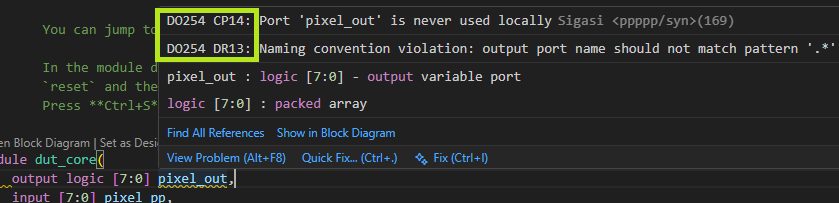
SVH analyzes your code as you type. Findings appear directly in the editor (squiggles + hover message, as above) and in the Problems view (as below), and include the relevant DO-254 rule identifier.
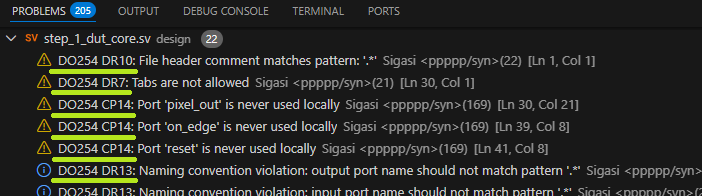
DO-254 rules configuration files
SVH linting rules are configurable per project. Each rule has a severity (ignore / info / warning / error) and some rules support parameters (e.g., naming patterns).
Sigasi provides DO-254 guideline configurations as two JSONC files:
- VHDL: DO_254_VHDL.jsonc
- Verilog and SystemVerilog: DO_254_Verilog.jsonc
A new-style Sigasi project is required to use these configuration files. It is possible (but not recommended) to set them up in legacy projects. If you need DO-254 support in a legacy project, contact Sigasi Support.
Although the guideline paper was originally focused on VHDL, many practices generalize to Verilog/SystemVerilog as well. SVH can fully or partially validate approximately 46% of the DO-254 guidelines for VHDL, and about 25% for Verilog.
Using DO-254 checks in Sigasi Enterprise Edition
With Sigasi Enterprise Edition, copy the JSONC files into your project and include them in .sigasi/settings.json:
{
    "@include": [
        "../DO_254_VHDL.jsonc",
        "../DO_254_Verilog.jsonc"
    ]
}
Paths are relative to the .sigasi folder. The example assumes the JSONC files are in the project root.
Using DO-254 checks in other Sigasi editions
If you don’t have Enterprise Edition, copy the contents of the downloaded files into your project settings file: .sigasi/settings.json.
Any customizations (described below) also go into the same settings file.
Rules customization
Several DO-254 rules require you to apply a standard without defining the exact content of that standard. An example is DR13 (“Ensure company-specific naming standards”): DO-254 expects consistent naming conventions, but each organization must define the actual patterns.
That means the provided DO-254 configuration should be treated as a starting point, and must be customized to match your team’s conventions before use.
The fastest way to customize is using SVH’s Quick Fix:
- Click the lint message in the editor (or Problems view)
- Quick Fix… > Configure rule for current project…
- Update settings (e.g., naming patterns as regular expressions)
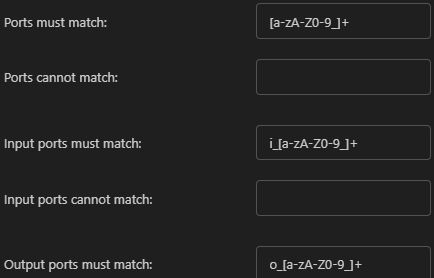
Alternatively, edit either the downloaded JSONC files, or .sigasi/settings.json directly. The SVH manual provides more details about settings files.
Enterprise users can keep baseline rules and local overrides separate by putting customizations in an additional file included on top of the provided rules. This enables a more elegant approach to maintaining and updating a project’s code linting configuration for a team.
Code formatting
DO-254 rule DR6 requires HDL code to be properly formatted. In Sigasi SVH, you can format the active file using either right-click in the editor and selecting Format Document, or with the keyboard shortcut.
You can also enable auto-format on save via VS Code’s
This helps teams apply consistent formatting continuously, rather than relying on manual cleanup during review.
Conclusion
The DO-254 best-practice coding guidelines provide a solid foundation for readable, reviewable RTL in avionics programs. SVH supports many of these guidelines upstream through deterministic linting and consistent formatting, helping teams reduce avoidable churn while keeping existing simulation, synthesis, and sign-off flows intact.
Some DO-254 topics remain outside SVH’s scope—especially CDC verification and synthesis-dependent checks. If there are DO-254 guidelines you rely on that you’d like to see supported, or if you’ve built internal rules, feel free to contact Sigasi Support with your suggestions.
Mapping DO-254 rules to SVH checks and features
There is no strict one-to-one mapping between DO-254 guidelines and SVH rules: one DO-254 item may map to multiple SVH checks, and one SVH rule may cover multiple DO-254 guidelines.
For the full mapping, see the SVH manual:
See also
- Enabling STARC rules in Sigasi SVH (knowledge)
- License server setup in Linux using Systemd (knowledge)
- 12,000 Downloads and Counting (news)
- Convert HDL documentation to PDF or Word (knowledge)
- Linting with Sigasi (on demand) (webinars)