STARC — the Semiconductor Technology Academic Research Center — was a research consortium established by leading Japanese semiconductor companies. Back in 2006, it released the STARC RTL Design Style Guides, a comprehensive collection of rules, recommendations, and best practices for RTL design. The guides cover everything from design creation and code management to verification workflows and general project organization, with separate volumes for Verilog/SystemVerilog and VHDL.
How Sigasi Visual HDL Supports STARC Compliance
Sigasi Visual HDL (SVH) is designed to make compliance with STARC guidelines easy and straightforward.
First of all, STARC repeatedly recommends the use of syntax-checking tools (e.g., Verilog rule 2.1.1.3, and VHDL rule 2.2.2.4). Simply by working in SVH — where syntax and semantic analysis are always active — you’re already satisfying these expectations.
But SVH can do much more. SVH checks your HDL code (VHDL, Verilog, and SystemVerilog) as you type, and you can configure SVH’s code checking rules to match the STARC rules and recommendations. SVH checks the HDL code for syntax errors, but it can also report suspicious code (i.e., syntactically correct but likely functionally incorrect) and perform code style checking for naming conventions, required headers, etc. As of 2025.3, SVH can be configured to check about 30 STARC Verilog/SystemVerilog rules and more than 70 STARC VHDL rules.

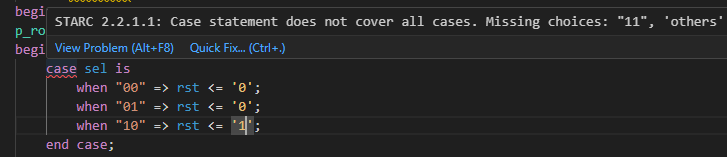
Whenever SVH detects a potential problem in your code, it highlights the suspect code and provides information on what’s wrong. As you can see in the examples above and below, error and warning messages include the STARC rule number for easy reference.
Also in the Problems View, suspect code messages are labeled with the corresponding STARC rule number.

Finally, STARC recommends that RTL code should be indented properly. Correctly indented code is easier to read and understand, and reduces the risk of mistakes. Format your code in SVH by right-clicking in the editor and selecting Format Document. Alternatively, use the keyboard shortcut Shift+Alt+F (Windows) or Ctrl+Shift+I (Linux). You can also configure SVH to automatically format your code every time when you save a file.
Configure SVH for STARC rules
Code linting
In this section, we assume that you’re working with a new-style Sigasi project. It is possible, but not recommended, to set up the STARC rules configuration in legacy projects. Customers who need STARC support in legacy projects may contact customer support.
The Sigasi STARC rules configuration conforming to the STARC Specification version 2 from 2006 are available as two JSONC files, one for VHDL, and one for Verilog and SystemVerilog. You can download these files from the links below.
- VHDL: STARC_VHDL.jsonc
- Verilog and SystemVerilog: STARC_Verilog.jsonc
Users of Sigasi Enterprise Edition can simply copy these files into their project and include them in the .sigasi/settings.json file as shown below. Note that the paths are relative to the .sigasi subfolder of your project. This example thus assumes that the .jsonc files are in the project root folder.
{
    "@include": [
        "../STARC_VHDL.jsonc",
        "../STARC_Verilog.jsonc"
    ]
}
If you don’t have Sigasi Enterprise Edition, you’ll need to copy the content of the downloaded files into your project settings file (.sigasi/settings.json).
You will also need to fine-tune some of the rules to meet your needs. For example:
- STARC requires a standardized header in all design files, but you need to configure what the header should look like.
- STARC requires different naming conventions for signals, variables, ports, etc. We’ve configured some naming conventions, which you may want to change according to your team’s requirements.
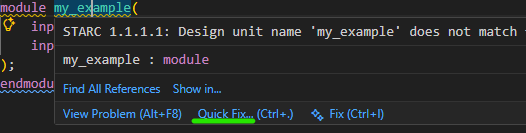
Sigasi Enterprise Edition users can put their customizations in a separate JSON(C) file which overrides the generic STARC configuration. Alternatively, you may use a quick fix to modify the coding rules, as shown in the image below. In the editor, click on the linting message, then Quick Fix…, then Configure rule for current project…. You can also activate the quick fix from the Problems view. Finally, you can also customize the coding rules by editing either the downloaded rules files or .sigasi/settings.json directly. The SVH manual provides more details about settings files.
Code formatter
As mentioned earlier, you can format the file in an open editor as follows: either right-click in the editor and select Format Document, or use the keyboard shortcut, to format your code.
You can also configure SVH to format your code each time when you save a file. This feature can be enabled with the
Conclusion
The STARC RTL Design Style Guides set a standard for good RTL design practices. With Sigasi Visual HDL, adhering to these standards in your source code becomes effortless. Your code will be easy to read and understand as it is well structured and nicely formatted. Naming conventions and the use of comments contribute to code which is easy to read and maintain. Having SVH check STARC design rules also leads to good synthesis results, by enforcing a consistent use of clocks and resets, properly coded combinational and sequential processes, avoiding combinational feedback loops and unwanted latch inference, and more.
Some STARC rules are out of SVH’s scope like the (obvious) ones on the outcome of RTL synthesis. Do you use a STARC rule which you feel should be in Sigasi Visual HDL or do you use custom rules? Contact our customer support team with your suggestions.
Mapping of STARC rules to SVH linting rules and features
The tables below show how STARC rules map to SVH linting rules and other SVH features like code formatting. Note that there is no one-on-one mapping between STARC rules and SVH rules: one STARC rule may correspond to multiple SVH rules, and one SVH rule may cover multiple STARC rules.
You can find how STARC rules map to SVH linting rules and features in the SVH manual:
See also
- Enabling DO-254 guideline checks in Sigasi SVH (knowledge)
- License server setup in Linux using Systemd (knowledge)
- 12,000 Downloads and Counting (news)
- Convert HDL documentation to PDF or Word (knowledge)
- Linting with Sigasi (on demand) (webinars)