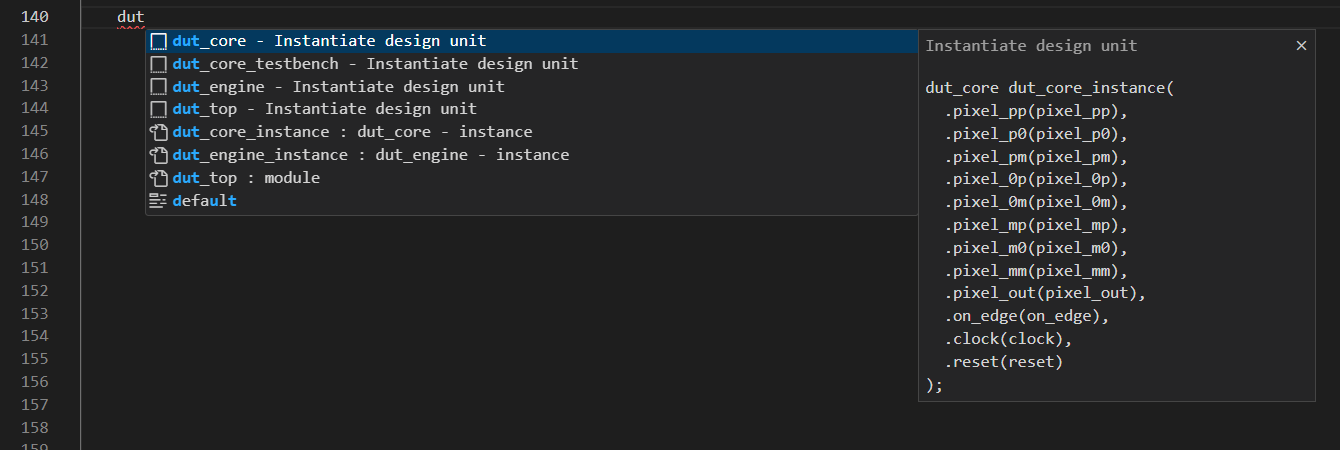
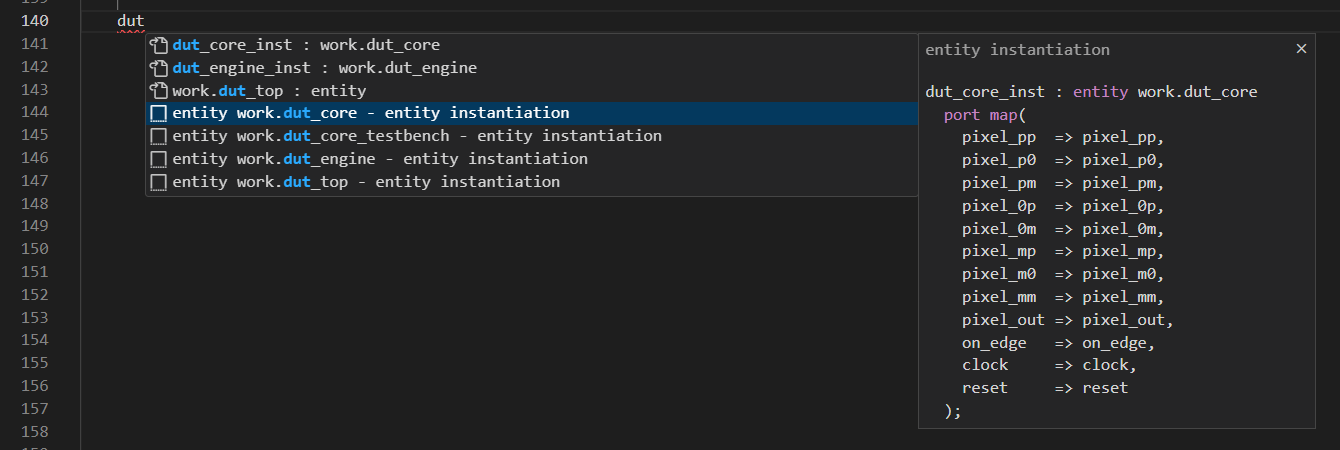
Sigasi provides powerful autocompletion capabilities. In the first place, this ensures that you don’t need to know most HDL syntax by heart. You also don’t need to exactly remember the names of elements you declared in your design. However, Sigasi goes much further than this. Because it knows your entire design and everything declared in it, it also provides autocompletion suggestions that adapt to your existing code.
In short, it takes your mind off the syntax and lets you focus on your design, and it relieves you from writing tedious boilerplate code.
There are a few types of autocompletion to distinguish:
- Static keyword: suggests keywords based on the allowed syntax at the current position
- Identifier: suggests previously defined identifiers (= names)
- Static templates: provides non-adaptive pre-defined and user-defined templates
- Dynamic templates: offers pre-defined templates that adapt to your design
- VS Code text autocomplete: suggestions provided by VS Code, based on previously typed text. While coding, you might not want to see these. They can be disabled via the
editor.wordBasedSuggestionssetting - VS Code snippets : templates provided by the VS Code ecosystem, that have no notion of context. We do not recommend their usage within Sigasi. Instead, use user-defined static templates
Autocompletion interface
Autocompletion suggestions come from different sources, as discussed in the following sections. However, their user interface is always the same. Sigasi will suggest appropriate autocompletion options at any point as you enter code.

You can also specifically trigger autocompletion suggestions by first placing your cursor where you want to insert code and then pressing Ctrl+Space .
Prefix matching
All of these autocompletion types use the concept of word prefixes. They will only suggest items that match the current prefix. Note that matches only occur at the start of word boundaries. Underscores virtually cut up identifiers into multiple words, e.g., my_clk is considered as my and clk when prefix matching.
| prefix | word | match |
|---|---|---|
cl | clock | ✅ |
cl | clk | ✅ |
cl | my_clk | ✅ |
cl | tcl | ❌ |
cl | myclk | ❌ |
Context
Sigasi’s autocomplete suggestions always take context into account. Whenever an autocomplete is performed, the position of the cursor is analyzed and a context is assigned to it. This context restricts autocomplete results to only those templates and constructs valid at your cursor’s position. For example, when your cursor is within a Verilog package or module, you’re in the DesignUnit context, and thus no module template will be suggested. In VHDL, you’d be in a PackageDeclaration when the cursor is in a package or EntityDeclaration when it is in an entity. Similarly, no package template or entity template would be offered in those locations.
Based on static templates
To help you declare HDL constructs, Sigasi comes pre-configured with static templates for all common declarations and statements. These do not require any design knowledge and their insertion will always look the same. These include constructs such as functions, always blocks, unions, structs, and (extern) modules in Verilog, and functions, processes, types (enum, file, range, array, record), and entities for VHDL.
The entire list can be viewed and customized in the templates editor. You can also define your own templates.
Template editing mode
Some autocompletion suggestions are templates that require further user input. In such a case, the editor window will go into a special template editing mode after performing an autocomplete. Use Tab to go through the items that have to be modified or completed. When done, press Enter to return to the normal editing mode. The cursor will be placed at an appropriate position to continue working.
Based on the design
Sigasi uses its knowledge of designs to provide intelligent autocompletion that boosts your productivity tremendously.
The tool understands which identifiers are visible and which constructs are legal at any given point in the code. As you start typing and ask for autocompletion, it will propose appropriate identifiers as autocompletion candidates and contextual autocomplete template suggestions for:
- Verilog VHDL component instantiations
- Verilog VHDL entity instantiations
- Verilog VHDL module instantiations
- Verilog VHDL case statements (based on variables/signals with an enumeration type)
- Verilog preprocessor/macro directives, e.g.,
`defineor`ifndef - Verilog include paths (
`include "") - VHDL component declarations
Instantiating a design unit
Note: In other tools, this feature may be known as paste as instantiation or port translation.
Sigasi can automate much of the instantiation process through its extensive design knowledge. At the point in the code where you normally enter a design unit’s name, use autocompletion instead to suggest a list of possible design units. Upon selection, the tool will complete the instantiation with a generic or parameter list and a port list with named associations. As an initial suggestion, each actual parameter will have the same name as its formal parameter. Of course, the actual parameter names need to be reviewed and edited by the user. Therefore, the editor will go into template editing mode after the autocompletion.
Note that design units will only be suggested if they are visible in the current scope.