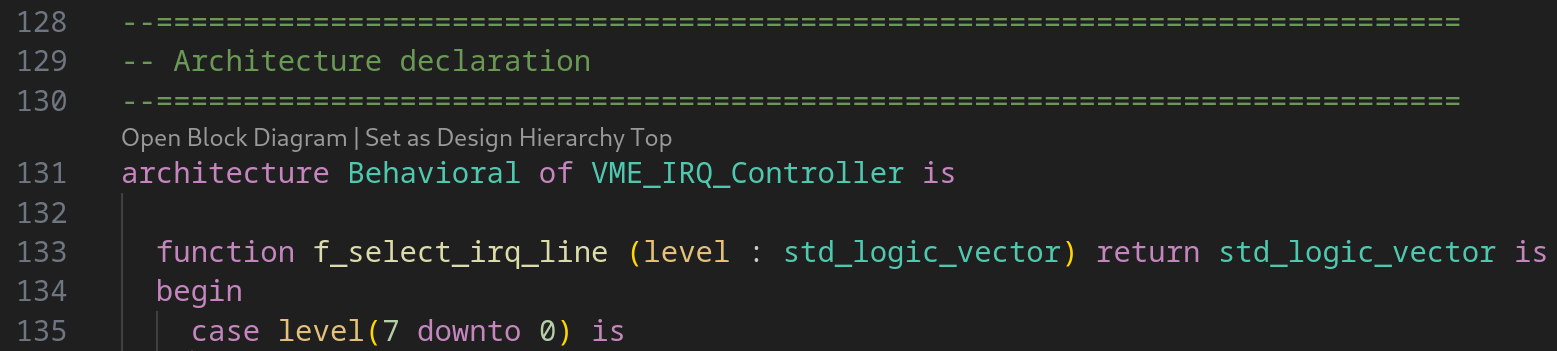
Code lenses provide you with shortcuts to contextual actions, right inside the editor. For example, instead of going through the context menu to set an architecture as Design Hierarchy Top, you can now simply click Set as Design Hierarchy Top.
Every code lens can be toggled on or off individually by changing one of the following settings:
Code Lens
Setting
Default
Export Compilation Order
sigasi.editor.codeLens.exportCompilationOrder
Export Documentation
sigasi.editor.codeLens.exportDocumentation
File is not part of any library
sigasi.editor.codeLens.fileIsNotPartOfAnyLibrary
Open Block Diagram
sigasi.editor.codeLens.openBlockDiagram
Open Class Hierarchy
sigasi.editor.codeLens.openClassHierarchy
Open State Machines Diagram
sigasi.editor.codeLens.openStateMachinesDiagram
Open UVM Diagram
sigasi.editor.codeLens.openUvmDiagram
Set as Design Hierarchy Top
sigasi.editor.codeLens.setAsDesignHierarchyTop
Set as UVM Topology Root
sigasi.editor.codeLens.setAsUvmTopologyRoot
Code lenses can also be disabled entirely by toggling the
editor.codeLens setting.