VS Code provides the Explorer view to browse through files and folders. To be able to fully represent your project and offer custom functionality, Sigasi offers a very similar Projects View. This view also offers a file browser for your projects, but it includes external folders that are not physically part of your project. This is especially useful for including external IP in your projects.
The Projects View offers a lot of custom Sigasi functionality, such as library mapping, version setting, and project settings, without overloading the Explorer view .
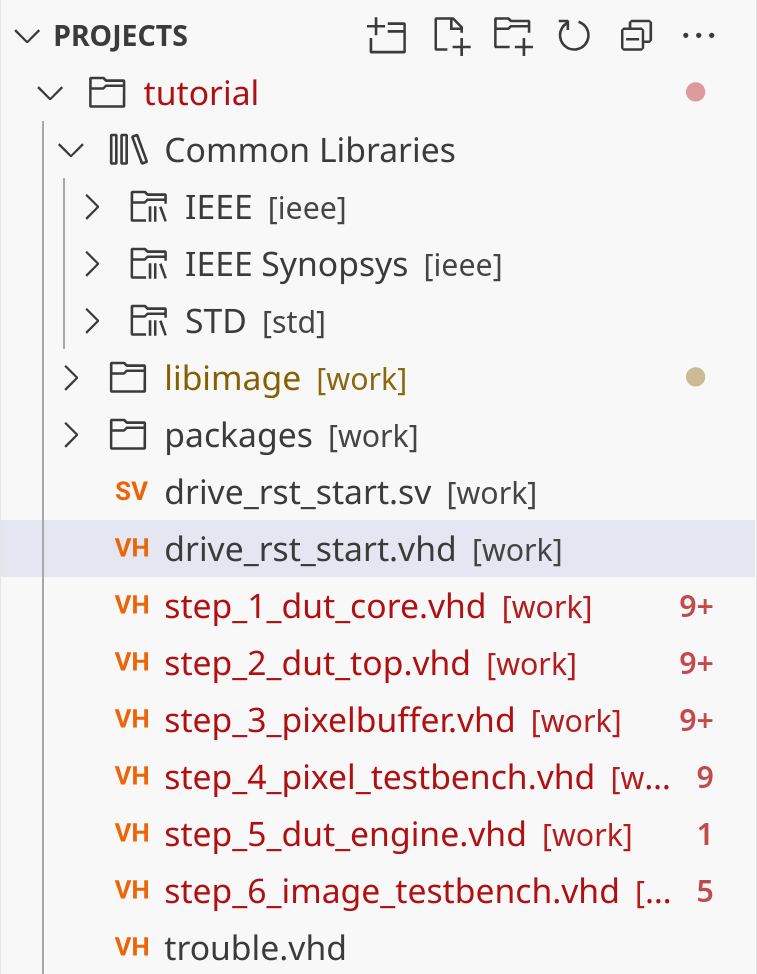
Buttons in the projects view
- Create and open a new project, or open an existing project
- Create a new file
- Create a new folder
- Forcefully refresh the contents of the projects view
- Collapse all folders in the projects view
- More Actions
Follow Cursor: links the projects view with the editorHide Excluded Files: toggles whether excluded files should be hiddenConfigure Excluded Files: opens settings to configure file exclusions
Excluding files
Files can be excluded from showing up in the Projects View. By default, Sigasi project configuration files like .project, .library-mapping.xml, and .settings are filtered.
The filtering can be customized through the following settings, accessible through the Configure Excluded Files button under More Actions… :
- The
sigasi.projectsView.excludesetting specifies a list of glob patterns to match files that will be excluded. - The
sigasi.projectsView.excludeNonHdlFilessetting ensures only HDL files are shown. - The
sigasi.projectsView.inheritGlobalExcludesetting determines whether the global exclusion filter from VS Code should also be applied.
Filtering can be toggled through the Hide Excluded Files toggle button under More Actions…
Excluded files are still processed by Sigasi. To exclude them from processing, remove them from the build.
Automatically showing the Projects View
By default, Sigasi switches to the Projects View whenever a Sigasi project is opened. If you prefer to keep working in the
Explorer view
or your own activity, you can change this behavior using the sigasi.projectsView.showOnStartup
setting:
always(default): Always show the Projects View on startup when a Sigasi project is opened.restore: Only show the Projects View if it was open at the end of the previous session.never: Never automatically show the Projects View.
Sigasi Projects in the Projects View
To accommodate new Modular Projects concepts, the Projects View represents such projects differently.
The structure of the captured project is visualized in two different forms: as a filesystem centric perspective and a logical Targets perspective.
Below the project root, all files and folders that are part of the project are shown. This allows you to navigate the structure of all directories that contribute to the project.
The captured information from the build script might refer to files from various locations on disk or configured include paths, or rely on files that are located on shared drives. These external files will also be shown below your project root. The names used for these external files and folders is based on your project environment. If these files and folders are relatively close to the project, a relative path will be shown. When we pick up environment variables that contain paths that match a prefix of these files and folders, we will show these. Alternatively, absolute paths are also shown as a fallback to point to external files and folders.
The Targets perspective reveals the logical structure of the project. For each defined target, a folder represents the libraries and their associated files. The files are rendered in the order of compilation wherever possible. This view will also reveal if some files are mentioned in the build scripts but are missing on disk.
You can open source files in the Targets perspective from the Code Lens at the top of the file.