To begin using Sigasi, you must first ensure your environment is properly configured. This page outlines the hardware and software prerequisites followed by step-by-step instructions for installing the extension in VS Code.
System requirements
- 64-bit Windows 10 or Windows 11
- 64-bit Red Hat Enterprise Linux RHEL 8 or higher (where glibc >= 2.17)
- At least 8 GB of memory
- About 1 GB of free disk space
On RHEL/Fedora-based Linux systems, you will need to install some prerequisite packages:
sudo dnf install -y \
libX11 libstdc++ glibc libnss3 nspr atk at-spi2-atk cups-libs libdrm glib2 \
libXcomposite libXdamage libXext libXfixes libXrandr mesa-libgbm expat libxcb libxkbcommon \
dbus-libs alsa-lib at-spi2-core libgcc libffi pcre gnutls avahi-libs libselinux \
libXrender krb5-libs zlib
VS Code requirements
Sigasi requires VS Code version 1.82.0 or higher. Our extension is known to work on clones of VS Code like VS Codium , Cursor , Antigravity , etc. Do note that we only deeply test on VS Code proper, so your mileage may vary.
Installation
If you have not done so already, follow these instructions to install VS Code.
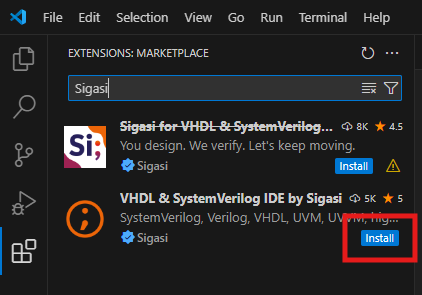
Next, install the Sigasi extension from within VS Code:
- Open the Extensions pane using
- In the Search field at the top, type Sigasi
- Click Install on the
 VHDL & SystemVerilog IDE by Sigasi extension
Before the extension is installed, VS Code verifies that you trust the publisher. Verify the publisher is indeed Sigasi and click Trust Publisher & Install.
More advanced ways of installation (e.g., for offline users) are detailed in Alternative installation methods.
Updating
VS Code automatically updates extensions by default.
Since VS Code version 1.85, fine-grained control over which extensions to auto-update is available.
You can right-click on the Sigasi extension in the Extensions pane and toggle the Auto Update option.