The Sigasi extension is built on top of VS Code. It is useful to review the layout of a typical VS Code window before we zoom in on how Sigasi fits in.
The screenshot below shows the different areas in a VS Code window. VS Code extensions can contribute items to every panel except the Title Bar. You can hide and show each of the areas.
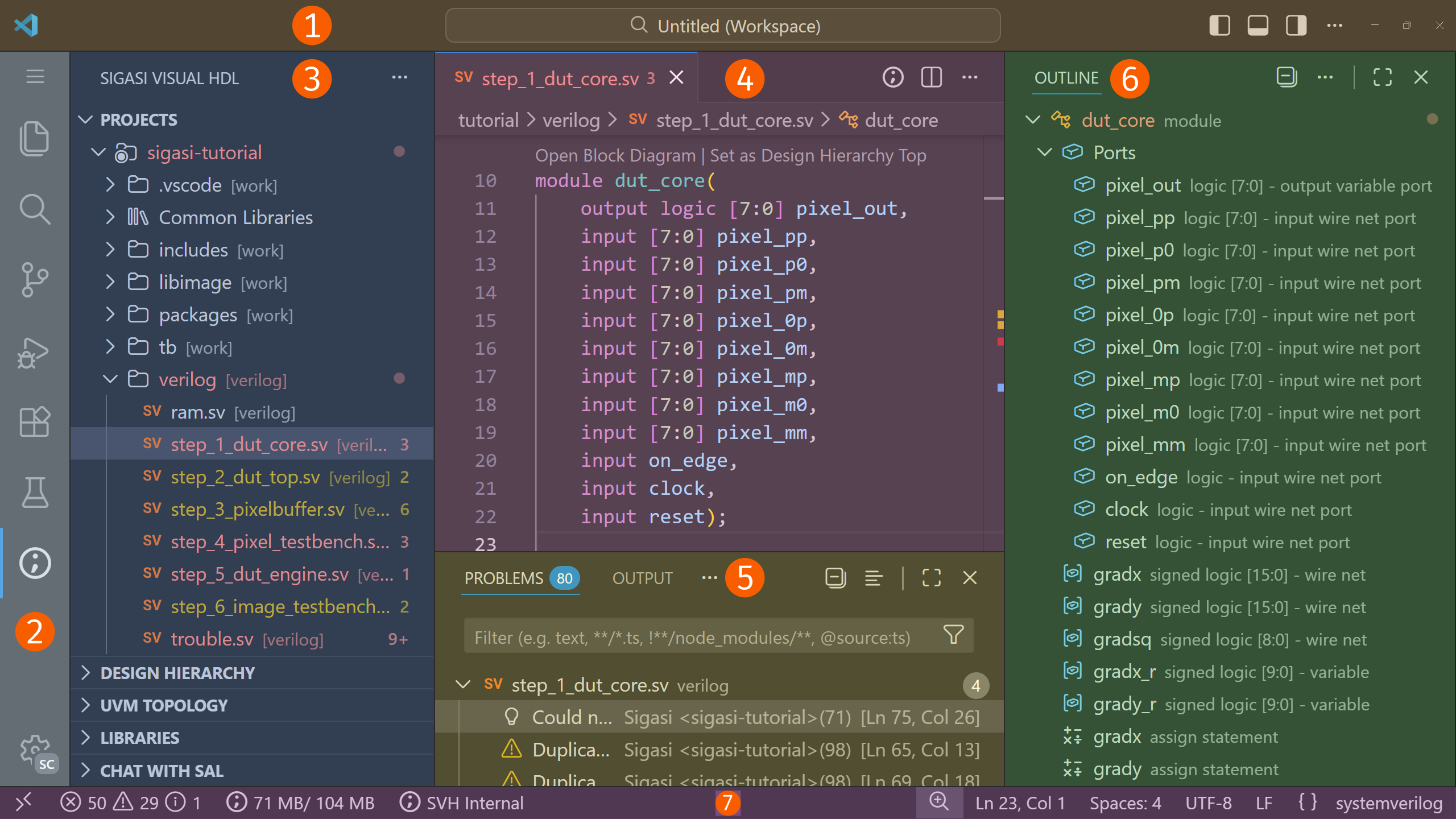
- Title Bar: The topmost bar. It contains layout controls and the command center to search and execute tasks.
- Activity Bar: The leftmost bar. It contains activity items for installed extensions, including the Sigasi View
 .
. - Primary Side Bar: The primary collapsible sidebar. It displays items depending on the activity that is selected in the Activity Bar. It contains items such as the Explorer, the Projects View, the Design Hierarchy, and the Libraries View.
- Editor: The main editing area for your files.
- Panel: The panel below the Editor area containing useful views such as the Problems and Terminal view.
- Secondary Side Bar: A secondary collapsible sidebar. Its items are independent of any selection. It contains items such as the Copilot Chat and the Outline.
- Status Bar: The bottommost bar. It shows the status of VS Code, Sigasi, and of other extensions.
Most items can be dragged and dropped between the Activity Bar, the Panel, and the two Side Bars.