Defining a dependency on another target makes HDL definitions from that target’s sources available in the current target’s sources, as well as in sources of all targets that would depend on this target. You can define a dependency on:
- Another target of the same project
- One or multiple targets of another project
- A library from the Library Database
Sigasi does not report errors, warnings, or linting issues in a dependency’s own sources. You can use this to avoid linting noise in code you cannot change and keep the analysis of your own project fast. Dependencies that are explicitly open in your workspace are still analyzed and linted in their own right. If you don’t want errors, warnings, or linting issues from a target dependency in the same project, for example a target that only exists to supply definitions to other targets, you can lower its analysis effort.
These dependencies can be added to a target in a project, by right clicking on a project in the Projects View and selecting . You can also right click a target
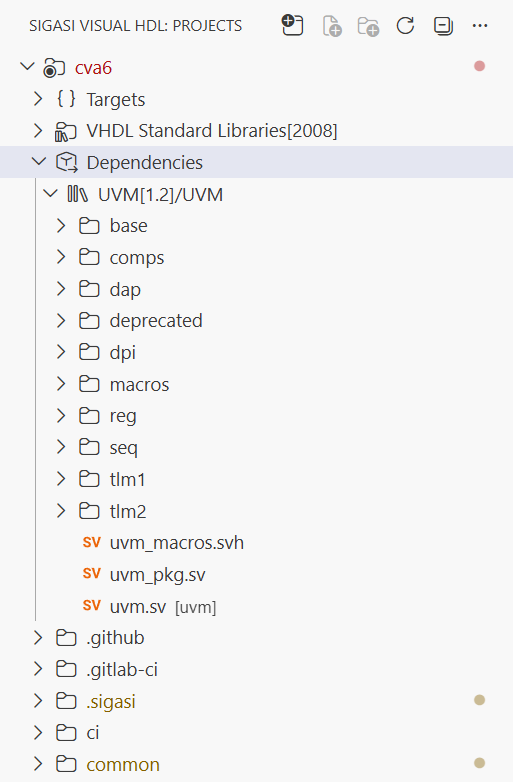
under the Targets folder in the Projects View and select to add a dependency specifically to that target. Dependencies will show up under the Dependencies folder.
To see how all targets in your project depend on each other, and to spot cycles or unresolved dependencies at a glance, open the Target Dependency Diagram.
Alternatively, you can add dependencies by editing the project.sigasi file yourself.
You can add a dependency to a target under the dependencies field.
You can also add a dependency to a whole project,
by specifying them under the dependencies field at the root of the project configuration JSON.
Adding a dependency to a whole project is equivalent to adding it to all targets in the project.
Each dependency is an object with dependency project name as a key, and an object with the following fields as a value:
| Field | Description |
|---|---|
version | Depend on the specified version of the referenced project, tool libraries, or library |
targets | Depend on the specified targets of the referenced project, or on libraries of the referenced tool |
When you want to specify only a specific version or target, or depend on a target of the current project, a shorter dependency declaration syntax is available:
| Short version | Full version |
|---|---|
{ "common_cells": "1.0" } | { "common_cells": { "version": "1.0" } |
{ "apb_uart": ["test"] } | { "apb_uart": { "targets": ["test"] } } |
"rtl" | { "current_project": { "targets": ["rtl"] } } |
Note that the latter form is only allowed for dependencies between targets of the same project. It cannot be used to specify dependencies of the whole project.
Example:
{
    "name": "Target Dependencies",
    "dependencies": [ // Dependencies for all targets of this project:
        // Dependency on all targets of another project named "common_cells" with version "1.0"
        { "common_cells": "1.0" },
        // Dependency on a target named "rtl" of another project named "apb_uart"
        { "apb_uart": ["rtl"] }
    ],
    "targets": {
        "ip1": { /* ... */ },
        "rtl": {
            // ...
            "dependencies": [ // Dependencies specific to this target:
                // Dependency on another target of this project with the name "ip1"
                "ip1",
                // Dependency on the UVM 1.2 library from the Library Database
                { "UVM": "1.2" },
                // Dependency on "altera" and "lpm" libraries from the latest "Quartus" tool in Library Database
                { "Quartus": [ "altera", "lpm" ] }
                // Dependency on Vivado 2023.2's "unisim" library from the Library Database
                { "Vivado": { "version": "2023.2", "targets": [ "unisim" ] } }
            ]
        }
    }
}
When you specify a dependency, Sigasi searches for them in:
- VS Code workspace folders,
- paths specified in the
sigasi.dependencySearchPathsetting, and specifically:- a directory at the specified path, and recursively all subdirectories thereof and
- a Library Database at the specified path, allowing using multiple Library Databases if necessary,
- the Path To Library Database specified in the
sigasi.pathToLibraryDatabasesetting, and - the
SIGASI_DEPENDENCY_SEARCH_PATHenvironment variable, which is formatted like thePATHenvironment variable, in the same manner as thesigasi.dependencySearchPathsetting, and - the Built-in Library Database that’s shipped with Sigasi. It contains the UVM library versions
1.1d,1.2,2017-1.1, and2020-3.1.
These locations are searched in order, and the first project or Library Database library that satisfies dependency requirements (name and version) is used.
You can use environment variables in the
sigasi.dependencySearchPathsetting. Supported formats:$ENV_VAR,${ENV_VAR}, and${ENV_VAR:default_value}. You can also use paths relative to the home directory (e.g.~/some/path).
version
If no dependency version is specified, the latest version found is used. Note that currently Sigasi does no interpretation of version strings, so:
- the latest version is determined by alphabetical comparison of version strings; and
- currently there’s no way to specify more complex version requirements (e.g., defining version ranges): only exact matches are supported.
Currently, only one version of the project or library can be present in a target’s dependency tree. If the dependency tree contains multiple versions of the same project or library, the last specified version (in other words, a version specified closer to the current target in a dependency tree) is used.
targets
Specify a list of targets of referenced project that should be available in current target. If no targets are specified, all targets from the referenced project become available. If an empty list is specified, no targets (other than targets already specified by other dependencies) are added.
Example:
{
    "name": "Dependency Version Override",
    "targets": {
        "common": {
            // ...
            "dependencies": [
                { "Vivado": { "version": "2021.1", "targets": [ "unisim" ] } }
            ]
        },
        "rtl": {
            // ...
            "dependencies": [
                "common",
                // Incorrect way to override version. It overrides version, but also adds all Vivado libraries.
                { "Vivado": "2023.2" },
                // Correct way to override a version. It overrides the version, but does not add any new libraries.
                { "Vivado": { "version": "2023.2", "targets": [] } }
            ]
        }
    }
}
Analysis effort
Not every source in a project needs to be fully analyzed.
Code that you don’t own, such as a vendored subfolder, a Git submodule, or a target that only exists to supply definitions to other targets, is effectively a dependency that happens to live inside your own project.
By setting the analysis effort of such sources to minimal, Sigasi treats them exactly like the sources of a dependency. As described above, their definitions are available to the targets that use them, but the sources themselves are not validated or linted.
To change the analysis effort, right-click on a target, folder, or file in the Projects view and select .
This is stored under the analysis.effort key in the settings file:
{
    "@override": {
        // A git submodule with third-party sources
        "vendor/apb_uart": {
            "analysis.effort": "minimal"
        }
    },
    "@targets": {
        // A target that only provides definitions to other targets
        "cells": {
            "analysis.effort": "minimal"
        }
    }
}
The analysis effort defaults to full and follows the regular setting priorities.
So a file can be analyzed fully in one target and minimally in another, and setting full on a more specific path brings that folder or file back into full analysis.
Fragments
A target can be marked as a fragment. This disables validation of that target unless it is added as a dependency of another non-fragment target. Fragment targets are validated in the context of the non-fragment targets that depend on them.
Fragments may be helpful if shared code is not complete (cannot be compiled) without specific configuration code.
Example:
{
    "name": "Fragment Targets",
    "targets": {
        "common": {
            "fragment": true,
            "libraryMapping": {
                "common": "work"
            }
        },
        "asic": {
            "libraryMapping": {
                "asic_cells": "work"
            },
            "dependencies": [
                "common"
            ]
        },
        "fpga": {
            "libraryMapping": {
                "fpga_cells": "work"
            },
            "dependencies": [
                "common"
            ]
        }
    }
}