The languageMapping of a manual target determines which files Sigasi compiles as VHDL, Verilog, or SystemVerilog,
and which language version it uses for them.
File suffixes
By default, files ending in .vhd or .vhdl are considered VHDL, files ending in .v are considered Verilog, and files ending in .sv are considered SystemVerilog.
You can change this with the vhdlSuffix, verilogSuffix, and systemverilogSuffix keys.
Note that these lists replace the defaults, so include the default suffixes if you still want to use them:
{
    "name": "manual-target",
    "version": "0.1",
    "targets": {
        "hdl": {
            "languageMapping": {
                "vhdlSuffix": [".vhd", ".vhdl", ".vhdp"],
                "systemverilogSuffix": [".sv", ".sva"]
            },
            // ...
        }
    }
}
Language versions
The vhdlVersion, verilogVersion, and systemverilogVersion keys set the language version for the whole target.
If you want to use a different version for specific folders or files, you can use the override key.
Its keys are paths relative to the target directory.
            "languageMapping": {
                "vhdlVersion": "vhdl-2008",             // VHDL files are VHDL-2008
                "verilogVersion": "systemverilog-2012", // .v files are SystemVerilog 2012
                "override": {
                    "legacy": {
                        "vhdl": "vhdl-1993",            // VHDL files in the legacy folder are VHDL-1993
                        "verilog": "verilog-2005"       // .v files in the legacy folder are Verilog 2005
                    },
                    "rtl/fifo.vhd": "vhdl-2019"         // This file is VHDL-2019
                }
            },
See the project description file reference for all possible values.
Changing the language version in the Projects View
You can also change the language version by right-clicking a project, target, folder, or file in the Projects view and selecting .
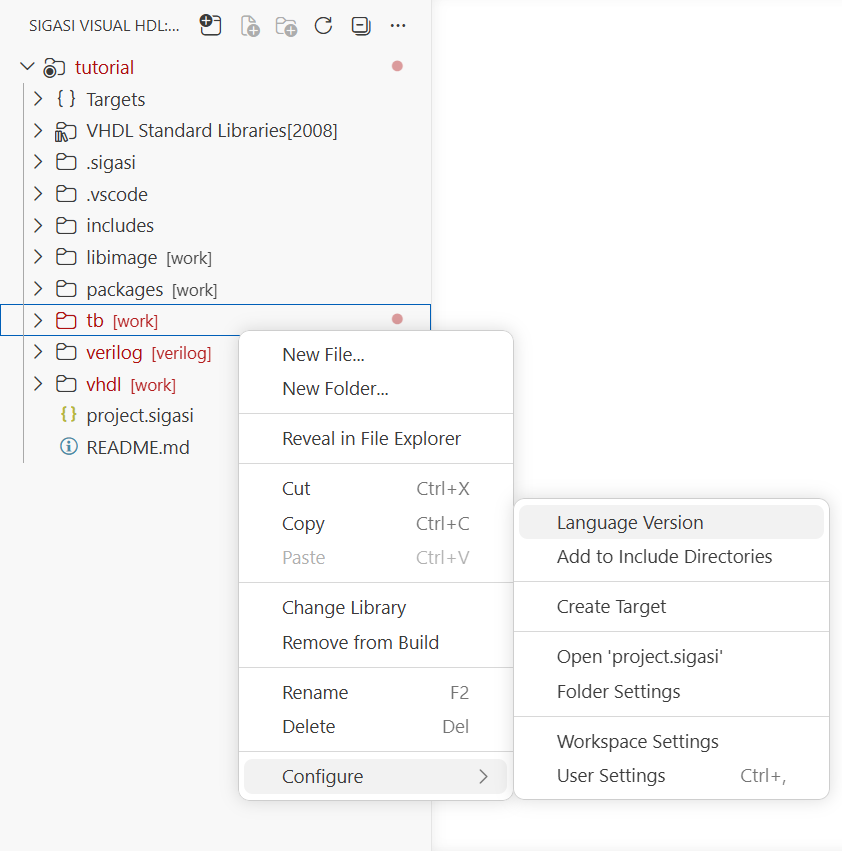
The wizard then asks you to select:
- the target, if more than one target is available
- the language, Set VHDL version… or Treat .v files as…, if both apply to your selection
- the language version
The languageMapping in your project.sigasi file will be updated accordingly.