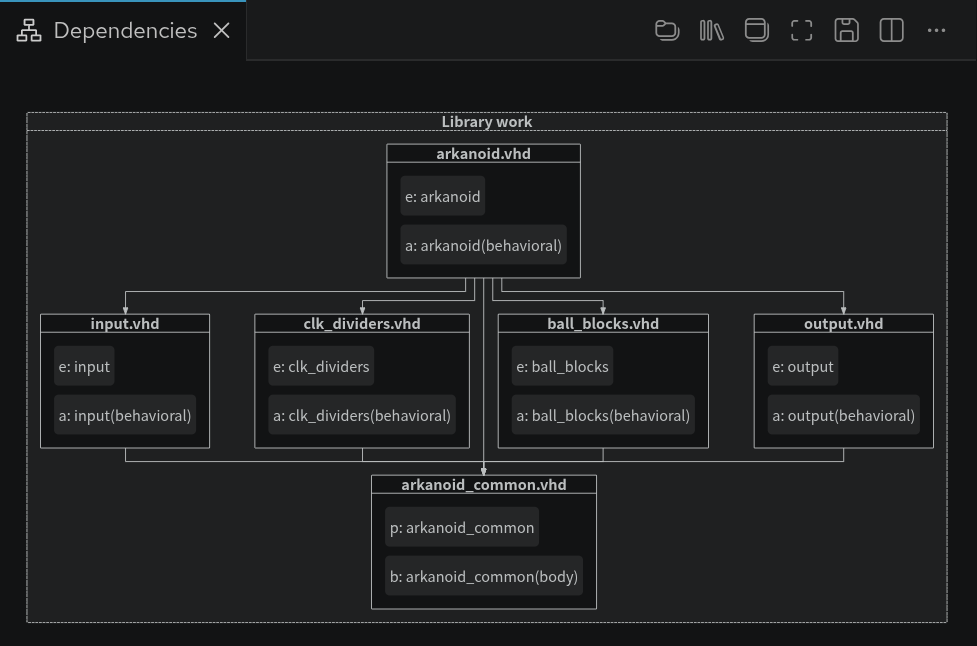
The Dependencies Diagram visualizes the dependencies of your Verilog, VHDL, and mixed-language projects. This diagram shows the relationships between your source files and makes it easy to see top levels (no incoming edges, only outgoing) and important packages. The Dependencies Diagram also makes it easy to detect orphaned files (no incoming nor outgoing edges).
The diagram is automatically updated each time you save your files or change your project setup. A dependency is visualized through arrows between two blocks. For example, A ⭢ B means that A depends on B.
You can open the Dependencies Diagram by clicking the Sigasi logo  in the editor toolbar (top right) and selecting Open Dependencies Diagram. Alternatively, you can open the diagram using the command palette Ctrl+Shift+P
and typing
in the editor toolbar (top right) and selecting Open Dependencies Diagram. Alternatively, you can open the diagram using the command palette Ctrl+Shift+P
and typing Sigasi: Open Dependencies Diagram.
The Dependencies Diagram is often used for visual navigation. Double-click a filename in the diagram to open the corresponding editor.
You can also navigate from your code to the Dependencies Diagram. To reveal a design unit: right-click it, select Show in… in the context menu, and then select Dependencies in the pop-up menu. Show in… can also be accessed directly from the hover of a design unit. The Design Units need to be visible to use Show in….
Note that preprocessor dependencies are not shown in the diagram. Additionally, no elaboration is performed. Thus, conditionally generated blocks will always create dependencies, even if the condition can never be fulfilled in the current configuration.
Buttons in the dependencies diagram
- Toggles between showing the dependencies of the entire project or only those of the file in the active editor
- Groups design files per library
- Shows design units inside design files prefixed with an abbreviation of their kind
- Automatically resizes the block diagram to fit in the current viewport
- Save the diagram as an SVG. Other file formats are not supported
Design unit prefix table
Verilog
| Prefix | Design unit kind |
|---|---|
cf | Config |
ch | Checker |
if | Interface |
m | Module |
p | Package |
pr | Program |
u | UDP (User-Defined Primitive) |
VHDL
| Prefix | Design unit kind |
|---|---|
a | Architecture |
b | Package body |
c | Configuration |
e | Entity |
i | Package instantiation |
p | Package |
x | Context |