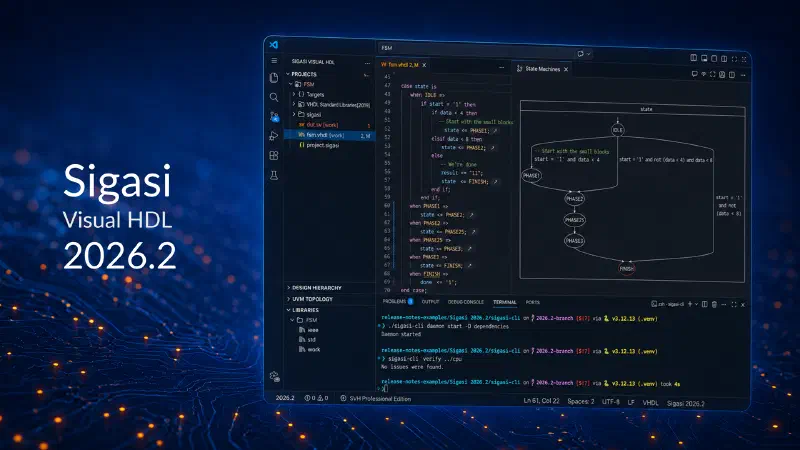
Faster AI-Assisted RTL Development, with Engineers Still in Control
Sigasi Visual HDL 2026.2
AI can generate HDL fast but in professional FPGA and ASIC development, that speed only matters if teams can still understand, validate, and trust what moves downstream. That is what Sigasi 2026.2 is built for.
This release strengthens three things that matter in an AI-driven RTL workflow:
- a better project foundation for AI with Modular Projects
- stronger AI integration through MCP
- faster deterministic validation and automation through the rewritten Sigasi CLI
The result is simple: faster convergence on engineering-ready RTL, with less project friction, better visibility, and fewer wasted AI iterations. Read the technical release notes for existing Sigasi users here.
A better starting point for real projects
AI-assisted development only works if the project itself is well grounded. If library mappings, build scripts, toolchain definitions, IP dependencies, and team settings are fragmented, engineers waste time rebuilding context — and AI assistants reason over incomplete information.
That is why Modular Projects matter so much in 2026.2.
They become the default for new AI-assisted and future-oriented workflows. Modular Projects give teams a more reproducible, more scriptable, and more shareable project structure. They are designed to reuse existing build scripts and toolchains, keep projects in sync with environments such as Vivado and VUnit, support stronger IP reuse, and make settings sharing and safety-oriented rule sets easier to manage across teams.
- For engineers, that means less setup friction.
- For CAD managers, it means a cleaner and more governable source of truth.
- For AI-assisted workflows, it means better grounding from the start.
Better AI starts with better context
General-purpose AI tools are good at generating plausible code. They are not good at understanding HDL projects by themselves. They do not inherently know:
- the real compilation plan
- design hierarchy
- include chains
- dependencies
- project rules
- or how your codebase is actually structured
That is where the new Sigasi MCP server matters.
With MCP in 2026.2, Sigasi can feed deterministic design information into AI assistants in environments such as VS Code + Copilot and Cursor, helping them reason over the actual project instead of just plausible-looking text.
This is a big step toward what we believe AI in RTL development should look like: not more guesswork, but better grounded reasoning.
Faster iterations for engineers, agents, and CI
Sigasi 2026.2 also includes a fully rewritten Sigasi CLI, aligned with the behavior of Sigasi for VS Code and now available with daemon support for faster repeated calls. That makes it especially useful for AI agents and CI/CD flows that need deterministic feedback at high frequency. In practice, this helps teams:
- shorten AI iteration cycles
- reduce unnecessary re-generation
- keep CI and automation consistent with the editor experience
- and move faster from generated code to validated code
That is one of the most important themes of this release: AI can reduce coding time, but only deterministic validation turns that speed into real engineering progress.
More insight for engineers into what the design actually does
2026.2 also improves how engineers understand and inspect RTL. The State Machines Diagram now shows all conditions and their relations much more clearly, with transitions automatically simplified and composed.
Dependency analysis has also been fully rewritten and made more accurate, with clearer distinctions between compilation, elaboration, and preprocessor dependencies. This improves compilation orders, recipes, external compiler integration, and the semantic foundation Sigasi builds on.
For teams reviewing complex RTL — whether written by engineers or generated by AI — this means one thing: less black box, more understanding.
Easier migration, broader workflow support
If you are using our Classic Project setup (which was default until now), 2026.2 brings important improvements there as well. External Compilers and Compilation Recipe are now available for both Classic and Modular Projects, making the path forward much smoother for teams moving from legacy Eclipse-based setups into the newer VS Code-based flow.
At the same time, imports for Vivado and VUnit make it easier to bring existing projects into Sigasi and keep them in sync over time.
So whether your team is already pushing into AI-assisted RTL development or simply trying to modernize and standardize project setup, 2026.2 gives you a more practical foundation.
Why try Sigasi 2026.2 now?
If your team:
- is experimenting with (or already using) AI for RTL generation
- wants an easier project setup and better reproducibility
- reviews more generated HDL than before
- manages large codebases with growing dependency complexity
- tries to reduce wasted AI iterations and verification pressure
then Sigasi 2026.2 is worth a closer look.
It helps teams:
- ground AI in the real design
- validate RTL at coding speed
- understand complex projects faster
- reduce rework and unnecessary regeneration
- and keep engineers in control of what gets delivered
See it in your own workflow
The best way to understand Sigasi 2026.2 is to use it on a real project. We are so convinced about the value, we offer it free of charge so you can see how Modular Projects, MCP, the new CLI, improved dependency analysis, and richer visualization help your team move faster without giving up control. And to help you get started, we’ll also include a personalized 30 minutes demo session with one of our HDL experts.
AI can generate HDL fast. Sigasi helps you make sure that speed turns into engineering-ready RTL.
One month Sigasi for free
Not yet a Sigasi user? Claim one month of Sigasi Visual HDL 2026.2 and a demo completely free of charge. No commitments. No credit card. Just a great opportunity to explore how Sigasi helps humans and AI agents work together in FPGA and ASIC development.
2026-07-07