Sigasi MCP server opens to your AI agent in VS Code
Sigasi Visual HDL 2026.5
Sigasi Visual HDL 2026.5 opens the Sigasi MCP server to your AI agent running in VS Code (and Cursor), including Claude Code, OpenAI Codex, and Mistral Vibe. It also renders WaveDrom diagrams from your HDL comments, spell checks comments and strings, makes Modular Projects portable with a project-level dependency search path, and expands VHDL declaration checks.
Existing users can find the full technical details in the release notes.
Your agent, Sigasi’s project model
An AI agent can read HDL, but it does not know your library mappings, your hierarchy, or your team’s coding rules. The Sigasi MCP server gives it those facts. Through MCP, an agent can read Sigasi’s real linting violations, explore the structure of your project, and format HDL.
Until now, that connection was limited to a few environments. In 2026.5, it is open to every agent running inside VS Code: Claude Code, OpenAI Codex, Mistral Vibe, and others. The server runs inside the Sigasi extension, so the agent gets the same project-aware analysis you see in the editor, at the same speed.
Connecting an agent is a one-time step. The new MCP Registration Page shows the registration command for each supported agent, already filled in with the location of the Sigasi MCP server on your machine. Copy it, or let Sigasi run it for you.
The agent writes and changes the HDL. Sigasi analyzes it against the real project. You decide what moves forward.
Because the MCP server lives inside the extension, VS Code has to be open for an agent to connect. For agents that run without an editor, such as in CI, use the CLI.
MCP is part of the product, not an extra one
Some HDL tools offer MCP access as a separate product, with its own license next to the IDE. Sigasi does not. The MCP server is built into Sigasi Visual HDL and included in every edition: Designer, Professional, and Enterprise. There is no second product to evaluate, buy, or keep in sync.
That is a design choice, not a pricing detail. Sigasi Visual HDL is built for engineers and AI agents working on the same project. The engineer works in the editor while the agent uses MCP to query one single semantic model of the design. Both see the same hierarchy, the same libraries, and the same coding rules. When the agent changes a file, the engineer sees the diagnostics update in the editor, and the agent reads those same diagnostics through MCP.
Timing diagrams that live in the code
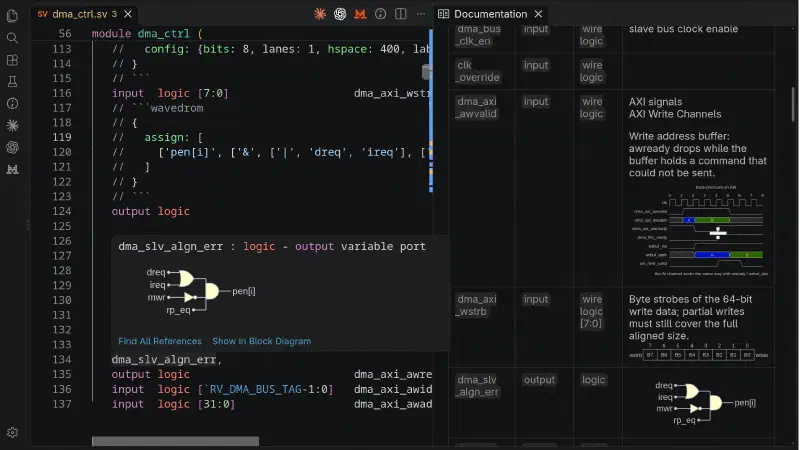
Describe a timing diagram, a register bit-field, or a logic circuit in WaveDrom inside an HDL comment, and Sigasi renders it in hovers, in the documentation live preview, and in exported documentation. The diagram sits next to the code it describes, so it is reviewed and versioned with it. You can also let your agent write the WaveDrom description.
Spell checking for comments and strings
Typos in comments end up in generated documentation and code reviews. Sigasi 2026.5 configures adds dictionaries with HDL keywords and common HDL vocabulary to keep false positives down and configures the Code Spell Checker extension for SystemVerilog, Verilog, and VHDL files. It only checks comments and string literals, never identifiers.
Modular Projects that work on every checkout
Modular Projects resolve their dependencies through the dependency search path. Until now, that absolute path was a global setting, which made it hard to share. In 2026.5, you can set it in the project description file itself, with relative paths and environment variables. A checkout now works the same way on every colleague’s machine. For nested setups such as Git submodules, adding “.” to the search path is enough to find every nested project.
New VHDL declaration checks
This release closes many long-standing customer requests in VHDL validation. New rules check subtype indications of signals, variables, constants, ports, generics, and more, and report unconstrained and partially constrained signals and variables. The duplicate declaration check now covers every declarative region, including record elements and declarations repeated between a package and its body. Simulators reject this code too. Sigasi now reports it one step earlier, while you write.
And more
Block diagram hovers now show signal and port types, autocompletion is faster in large projects, and the language server starts in the background before a project is open. The release also adds VHDL-2019 support for conditional expressions as actuals and for unary logical operators without parentheses, and fixes a long list of SystemVerilog sequence and property parsing cases.
Update or try it
If you installed Sigasi Visual HDL from the VS Code Marketplace, it updates automatically. New to Sigasi? Request a free trial and connect your own coding agent to your own project.
AI can generate HDL fast. Sigasi keeps engineers in control.
One month Sigasi for free
Not yet a Sigasi user? Claim one month of Sigasi Visual HDL 2026.5 and a 30 minutes setup session completely free of charge. No commitments. No credit card. Just a great opportunity to explore how Sigasi helps engineers and agents work together in ASIC and FPGA development.
2026-10-20