Sigasi Visual HDL™ (SVH™) 2026.1 features a new product manual, greatly enhanced Verilog code highlighting, improved SystemVerilog method support, a pile of new linting rules, and further refines the Sigasi projects (still under preview).
TL;DR
This release focuses on user experience and integration with third-party tools.
The new manual is more complete and greatly enhances the navigation and discoverability of its content. The typesetting and consistency were also improved to maximize clarity. Combined with a new “Getting Started” section, the new manual enables you to get as efficient as possible using Sigasi.
Code highlighting—the very first thing you see upon using Sigasi—was greatly improved, covering more Verilog and SystemVerilog constructs and handling more edge cases.
Adding on to the hundreds of existing linting rules, this release also adds a few general rules, but it mostly adds non-standard linting rules. These rules check compliance of code to the Language Reference Manual (LRM). However, often, some simulators allow violations of such rules, while others don’t. Sigasi flags a warning in this case, as violating these rules will make it difficult to switch to different tooling, even if compilation and simulation work fine on the current tools.
Sigasi projects’ scripted targets can now import VUnit and Vivado projects and keep them in sync with just one simple command. Furthermore, commands can now be intercepted to prevent side effects, and options can be ignored to cut down on warnings. Finally, whenever you encounter unresolved references in your code, you can add the missing dependency via a Quick Fix.
As a cherry on top, this release includes over 30 bug fixes and miscellaneous improvements.
New manual
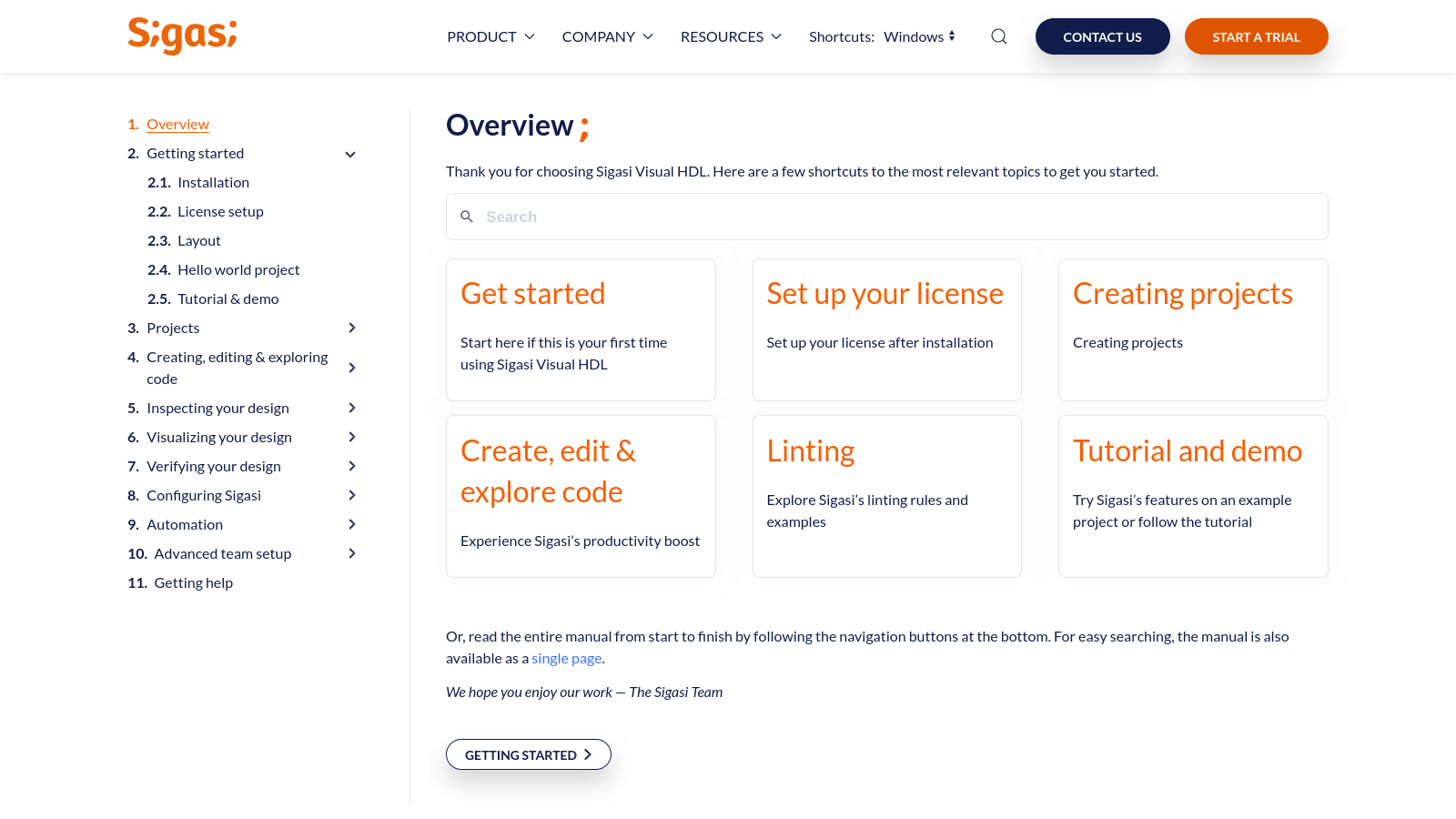
Even when using the greatest of products, you might occasionally need help. We modernized the manual to offer a more book-like experience with better navigation, more completeness, and a better getting started section. The Overview page features a prominent search bar, or you can quickly jump to some of the most important sections. It should now be a breeze to find the content you need through the manual overview on the left-hand side. The manual can also be read front to back by using the previous and next buttons. Additionally, the single page manual was cleaned up and also includes a full overview of all sections and chapters. Offline versions of the manual can still be found on our download archive.
Can’t find what you need yet? Or did you find an article that confuses you? Let us know!
Verilog code highlighting improvements
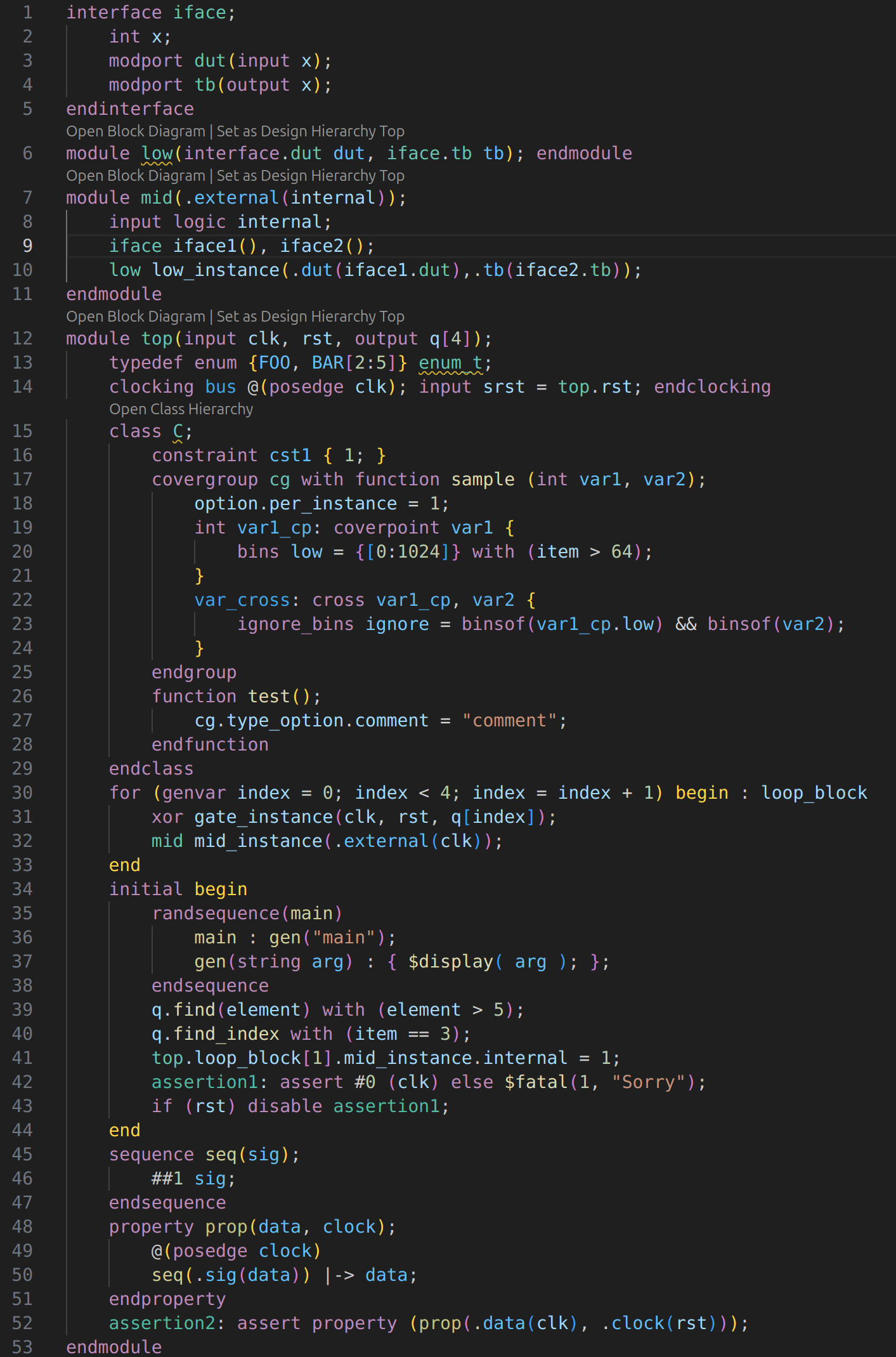
The first thing you’ll notice when browsing code with Sigasi is likely the many colors. Code is highlighted to visually distinguish and associate separate constructs. This release brings this coloring to many more Verilog constructs and edge cases, including:
- modports and generic modport
- explicit ports
- interface instances
- enum members with ranges
- clocking blocks
- clocking variables
- constraints
- samples in covergroups
type_optionsandoptionsin covergroups, coverpoints, and covercrossings- coverpoints, coverbins, iterators in coverbins, covercrosses, and implicit coverpoints
genvarfor generate blocks- randsequence production
- implicit variables in array methods
- labels for assertion blocks
- named sequences and ports therein
- named properties and ports therein
SystemVerilog method improvements
The support for methods in SystemVerilog was revamped, offering more features, better precision, and a more comfortable UX. Go to Definition (Ctrl+Click) now always goes to the function body instead of the prototype, while Go to Declaration always goes to the prototype. Internally, we also improved the linking of extern functions, function return variables, and methods over class hierarchies, no matter if they’re in the same file or spread across files. This leads to improvements in navigation, occurrence highlighting , renaming, and Find References.
The video illustrates that through the improved linking, Sigasi’s occurrence highlighting only highlights the exact same identifiers. For example, as Son extends Mother—defined in a separate file—which extends GrandMother, only Son.greet and GrandMother.greet are highlighted. Son is not related to Daughter, GrandDaughter, or the Greet visitors comment on line 2, so those are not highlighted.
As these are all correctly linked, Sigasi’s rename (F2) works much smarter than a simple text and replace. As shown in the video, all functions and return variables are renamed, but the comment on line 2 and the Father.greet variable in parents.sv remain untouched.
New linting rules
Missing instantiation in if-generate
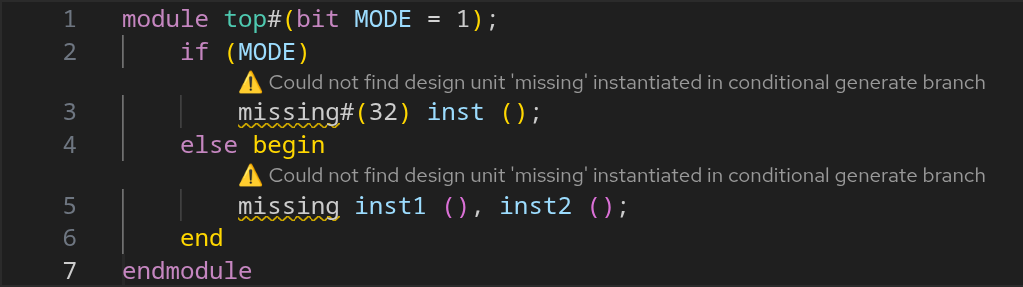
Verilog When an instantiation is made of a non-existent design unit, a warning is shown, even if the branch is not taken. The severity of this rule can be configured.Missing parameters/ports in instantations
Verilog When an instantiation is made and non-existent formal parameters or ports are referenced, an error is marked on these formals. The severity of this rule cannot be configured.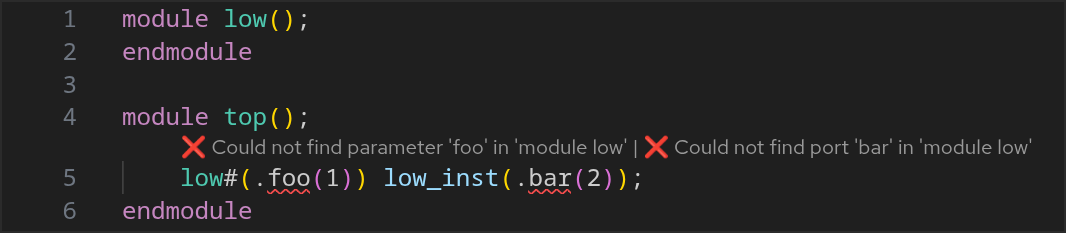
Truncated literal values
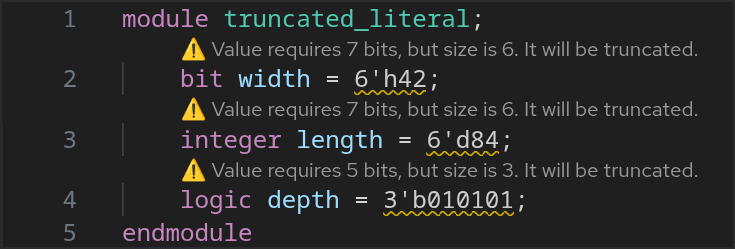
Verilog Sigasi now validates that number literals (e.g., ‘b or ‘x) are large enough to accommodate the value.
For example, 6’h42 is 42 hexadecimal—66 decimal—requiring 7 bits (1000010) to be represented, but we’re explicitly sizing it to only 6 bits. The first bit will be truncated, resulting in 000010, which is 2 decimal instead of 66. The severity of this rule can be configured.
Underscores-only number literal
Verilog Number literals can use underscores to increase the legibility of literals (e.g.,‘b1010_0101), but they cannot consist of only underscores. The severity of this rule cannot be configured.
Duplicated design unit warning
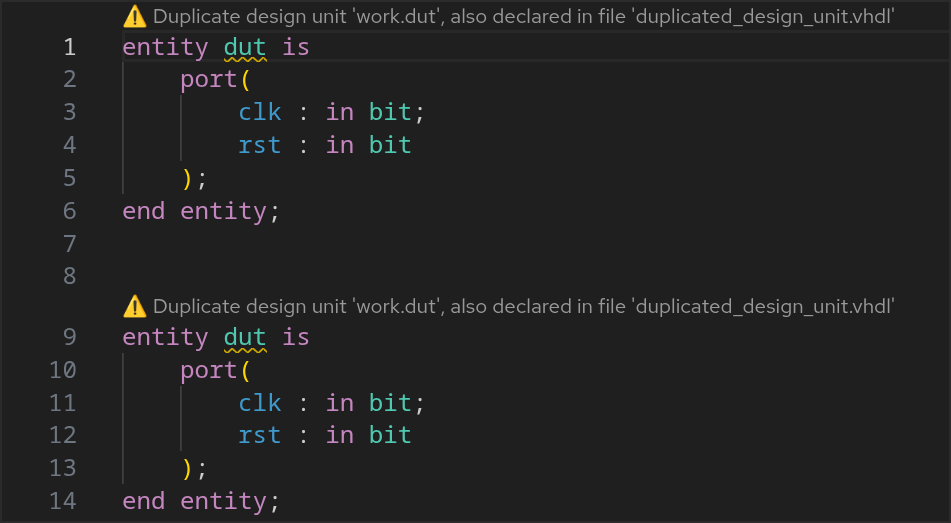
VHDL This pre-existing rule was turned from an error into a configurable warning to accommodate simulators that allow this behavior. The severity of this rule can be configured.Ambiguous reference warning
Verilog When making an instantation, but there are multiple targets with such name, Sigasi flags a warning. This pre-existing rule was turned from an error into a configurable warning to accommodate simulators that allow this behavior. The severity of this rule can be configured.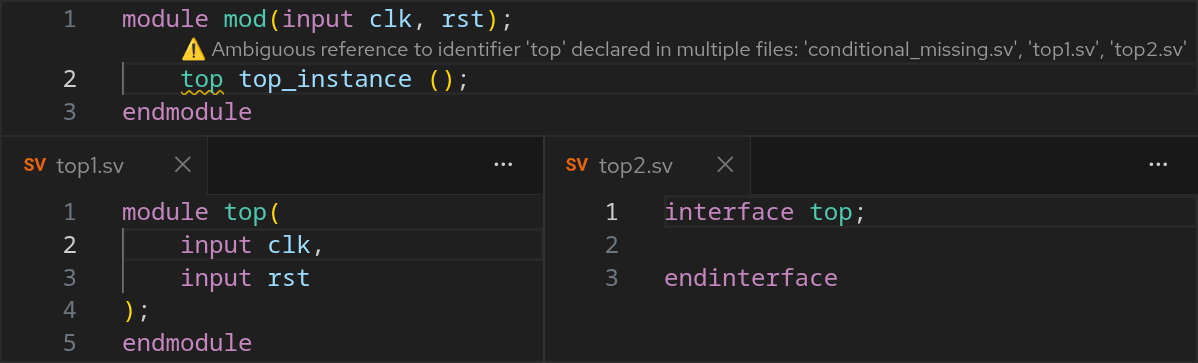
Non-standard linting rules
This release adds—or modifies—rules that check for behavior that is not allowed by the Verilog and SystemVerilog LRM but that is accepted by some simulators. Even if your simulator accepts this code, these issues can still be problematic, as you cannot easily switch to another simulator that might not accept the code or behave differently.
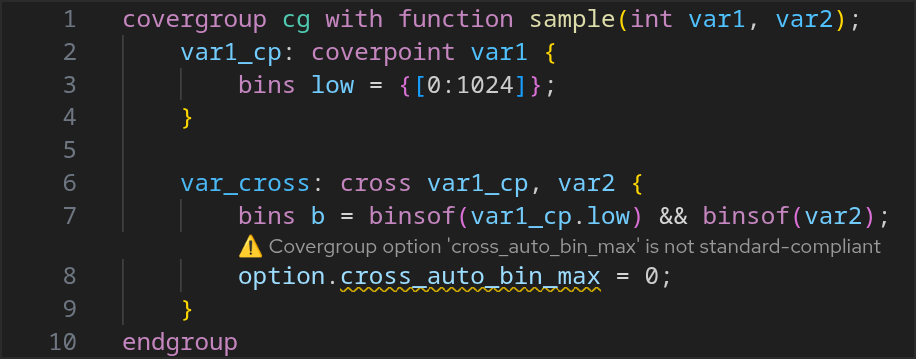
Non-standard 'cross_auto_bin_max' covergroup option
Verilogcross_auto_bin_max is a covergroup option that was removed in Verilog 2005 in favor of ignore_bins. The severity of this rule can be configured.Combining unary and increment/decrement operators
Verilog Unary and increment or decrement operators cannot be combined. Doing so would be confusing: which operator is applied first? If necessary, they can be combined by adding parentheses, e.g.,~(retries–). The severity of this rule can be configured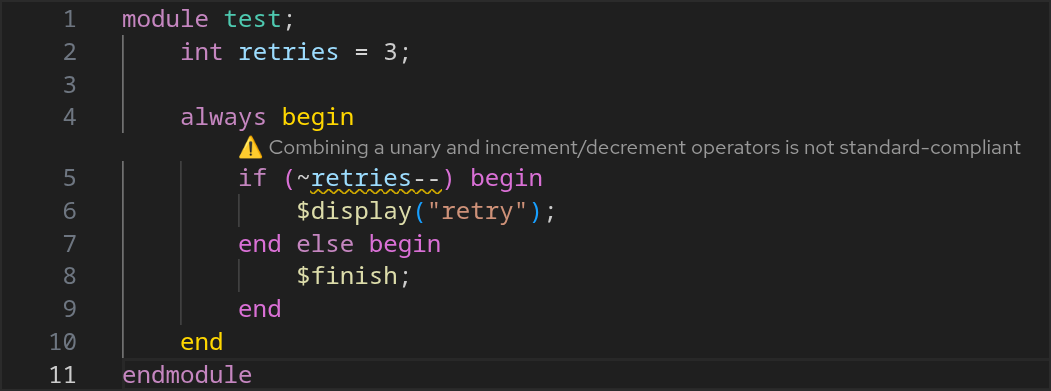

Conversion of integral to enum
Veriloginteger is not assignment compatible to enums, yet some simulators are fine with it. The severity of this pre-existing rule was downgraded to warning from error. The severity of this rule can be configuredAssignments without single quote
Verilog Assignments to arrays require the’{} notation, yet some simulators allow to leave out the single quote. A quick fix is offered on violations of this rule to add the missing single quote. The severity of this rule can be configured.
Sigasi Projects (Preview ✨)
Sigasi Projects, introduced in Sigasi Visual HDL 2025.3 as a preview feature, enable Sigasi to seamlessly integrate with your existing workflow. We are still hard at work refining this feature before making it generally available.
Import Vivado and VUnit projects
We are excited to introduce a new automated import functionality for third-party projects. This feature allows you to seamlessly integrate existing projects into Sigasi by leveraging a built-in TCL interpreter.
Two import procedures are shipped with Sigasi: import_vivado for Vivado projects and import_vunit for VUnit projects.
These procedures execute compilation scripts to extract compiler invocations and derive the project structure from them.
This makes importing Vivado or VUnit projects as simple as writing a couple of lines in the project.sigasi file.
Besides the built-in import procedures, you can also create your own custom import procedures to support other tools or workflows.
Learn more about importing third-party projects
Learn more about extending the TCL interpreter
Target creation
Targets are the core building blocks of a Sigasi project.
They define how your design needs to be compiled and analyzed.
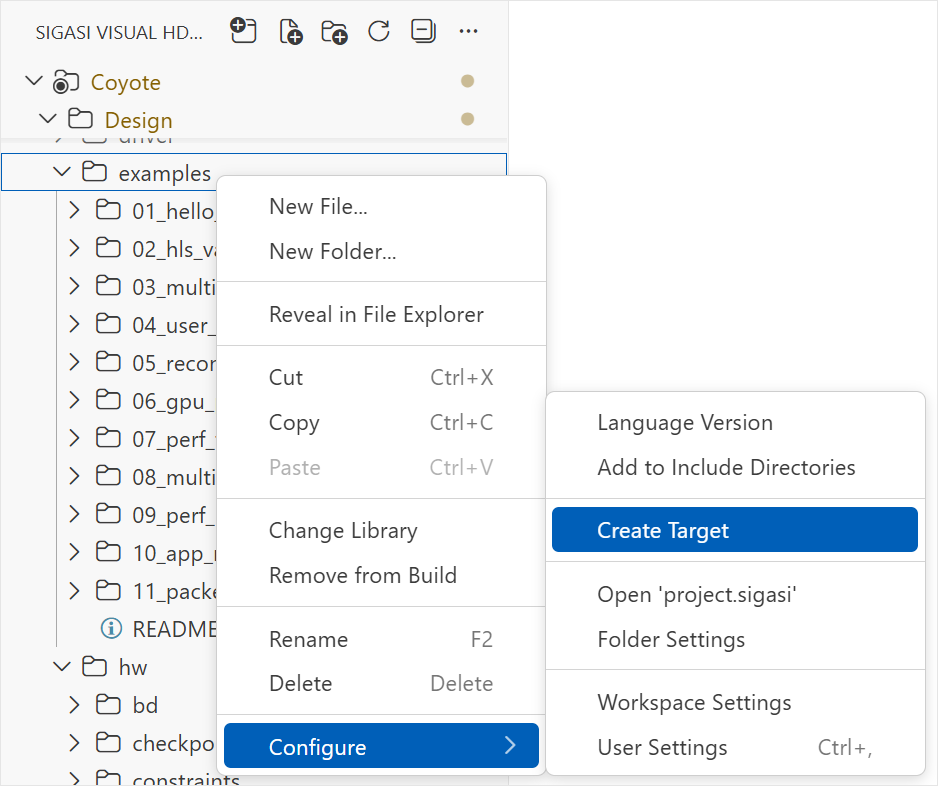
A newly added menu action in the Sigasi Projects View allows you to easily create new targets.
After picking a name and directory for the target, you can configure more details for the target in the project.sigasi file.
Advanced options for Scripted Targets
Scripted targets now support two new configuration fields, giving you finer control over how Sigasi handles external compiler invocations and project refreshes. These options help to reduce noise in your logs and prevent unwanted side effects from complex build scripts.
Use the acceptUnsupportedOptions field to silence warnings for compiler flags that Sigasi does not recognize.
You can list specific flags to ignore across all tools or for individual compilers.
Wildcards can be used to efficiently filter out groups of unrecognized options with a single entry.
Learn more
The new intercept field allows you to ignore specific commands within your build scripts that might otherwise interfere with compilation.
When Sigasi runs your compilation commands, intercepted binaries will be caught and ignored.
To help avoid common infinite refresh loops, the touch command is now intercepted by default.
Learn more
The example below demonstrates these two new options.
Sigasi does not recognize the -timescale and -access options, so they can safely be ignored.
The generate_docs command is part of the build script but is very slow and might generate new files.
It does not affect the compilation, so it can be intercepted to prevent these side effects during compilation.
{
  "name": "Advanced Scripted Target",
  "targets": {
    "rtl": {
      "command": "make -f Makefile",
      "acceptUnsupportedOptions": ["-timescale", "-access"],
      "intercept": ["generate_docs"]
    }
  }
}
Quick fix for unresolved references
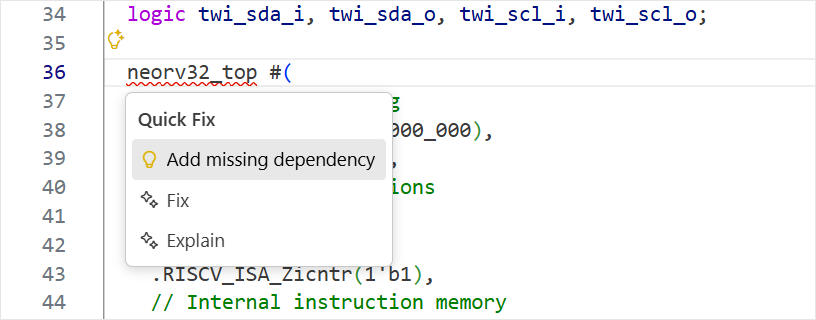
When Sigasi encounters an unresolved reference in your code, a new Quick Fix is now offered to help you resolve it. This Quick Fix will search through the projects that are opened in your workspace to find a dependency that provides the missing reference.
Further new and noteworthy
Besides the above-mentioned features, the following improvements were made to Sigasi Projects:
- Conflicting dependencies that introduce ambiguous references now mention the involved targets
- Added support for
quietly,quiet, anddoin.dofiles for scripted targets runningvsim - Added a Quick Fix and autocomplete action to open the compiled file when looking at a symlink version of said file
- Improved language support on symlinked files
- Include dependencies (from the library database and VHDL targets) when using External Compilers
Quality of life
- Always offer
workduring library mapping - Made the
APPLYbutton always visible in the settings pages - Verilog Added autocomplete template for if statements
- VHDL Added parameter names to hover documentation of subprograms
- VHDL Improved comment association rules for trailing comments on multi-line statements
Further new and noteworthy
- Added performance logging (enabled by setting
sigasi.server.log.level info) - Added support for mixed language hierarchies, i.e., instantiating VHDL entities in Verilog and Verilog modules in VHDL
- Added support for mixed language bindings, i.e., binding VHDL entities to Verilog modules
- Stopped writing log files to the workspace, instead logs can be found through different means
- Adopted VS Code’s new icon style
- Verilog Allowed absolute include path in project & target settings
- Verilog Improved include path validation in project & target settings
- Verilog Improved hover for
optionin covergroups, coverpoints, and covercrossings - VHDL Added hovers for operators (
*,/,+, etc.) - VHDL Made
Jump to stateinlay hint configurable viasigasi.editor.inlayHints.jumpToState
Bug fixes
- Fixed refreshing of the Projects View for the
sigasi-docfolder - Fixed unintentional deletion of files during quick, consecutive drag and drop actions in the Projects View
- Fixed missing connections to files in Library Database in the Dependencies Diagram
- Fixed Go to Implementation from VHDL components to Verilog modules in files that are included
- Fixed the External Compiler context menu when the workspace folder differs from the project name
- Verilog Fixed top level import visibility when compiling several files as one compilation unit, e.g.,
vlog -mcfu pkg.sv dut.sv tb.sv - Verilog Fixed rare missing autocomplete near unresolved declarations
- Verilog Fixed false positives for some macro invocations without spaces between the surrounding code, e.g.,
int x = `FALSE?0:1 - VHDL Fixed extended identifier (e.g.,
\Adder\) linking despite differing casing - VHDL Fixed false positive error on functions in constant declarations
- CLI Fixed unintended removal of directories when passing invalid
--aliasoptions tosigasi-cli extract
Update or install
If you have downloaded SVH from the VS Code Marketplace , your installation will automatically update.
You can also download the latest .vsix file and manually install it in VS Code.
- Linux: https://download.sigasi.com/vs-code/updates/latest/sigasi-visual-hdl-linux.vsix
- Windows: https://download.sigasi.com/vs-code/updates/latest/sigasi-visual-hdl-windows.vsix
The SHA sum is downloadable from https://download.sigasi.com/vs-code/updates/latest/vs-code-sha1.txt .
System requirements
Sigasi Visual HDL requires:
- Windows 10 or Windows 11 64-bit
- 64-bit Red Hat Enterprise Linux RHEL 8 or higher
- VS Code >= 1.82 and < 2.0
We recommend having at least 8 GB of memory and about 1 GB of free disk space available for Sigasi Visual HDL.
Feedback
Our Support Team happily welcomes any of your feedback.
Transition information
Sigasi Visual HDL 2025.3 marked the final feature release for Sigasi Visual HDL in Eclipse. We highly recommend you transition to SVH in VS Code now. Do not hesitate to contact us to help you with your transition.