Sigasi recently introduced an enhanced method for configuring and managing Sigasi Visual HDL projects. This update is more than a convenience feature; it addresses a growing challenge in modern RTL development: maintaining deterministic control as codebases, teams, and now AI-generated RTL scale.
In this article, we walk through practical use cases that demonstrate how the new settings management — especially linting configuration — helps large teams keep RTL consistent, reviewable, and aligned with project requirements.
As AI accelerates code generation, configuration becomes part of engineering control. Sigasi ensures that regardless of how RTL is produced, it is validated against clearly defined, project-aware rules that each project requires: team settings like naming conventions, company settings like adding a copyright/disclaimer in each file, and project-specific settings must all be configured and maintained. International coding standards such as DO-254 or STARC can also apply to a project. The goal of Sigasi’s new settings management is to provide you with a convenient, modular, and layered mechanism to configure and maintain settings.
The settings file
In a “new” Modular Project, settings are stored in .sigasi/settings.json in the project directory. The file uses JSONC (JSON with comments), allowing for JSON key-value pairs and descriptive comments within the configuration. Detailed documentation of the JSONC settings file format is available in the Sigasi manual.
Example:
{
    // VHDL formatting settings
    "vhdl.formatting.preserveNewlines": true,
    "vhdl.formatting.keywordsCase": "LOWERCASE",
    "vhdl.formatting.trailingCommentsAlignmentColumn": 50
}
Beyond simple key-value configuration, three mechanisms make the system powerful and scalable:
| Field | Description |
|---|---|
@override | Specify folder- or file-specific settings |
@targets | Specify target-specific settings |
@include | Include other settings files |
Together, these enable a modular, layered approach to configuration. This is essential for large teams and complex designs.
Why this matters now
RTL projects already require alignment across:
- team conventions
- company standards
- project-specific rules
- industry standards like DO-254 or STARC
With AI entering the workflow, the volume of RTL increases, but the need for correctness does not change.
AI can generate code quickly. It does not enforce your project’s rules.
Sigasi’s settings management ensures that every line of RTL, whether written manually or AI-generated, is validated deterministically, in full project context.
Use cases
Multiple targets, different rules
A single project often contains multiple build targets—such as synthesis and simulation—each with different constraints.
For example:
- Synthesizable RTL must follow strict coding rules.
- Testbench code may intentionally violate those rules.
Sigasi allows you to express this explicitly:
{
    "@targets": {
        "synthesis": {
            // These rules apply to synthesizable RTL code
            // SystemVerilog: use `always_ff`, `always_comb`, etc. instead of generic `always`
            "verilog.rules.170.severity": "ERROR",
            // VHDL: use downto for ranges
            "vhdl.rules.241.severity": "WARNING",
            "vhdl.rules.241.parameters.direction": "DOWNTO",
            // VHDL: use synchronous reset
            "vhdl.rules.252.severity": "ERROR",
            "vhdl.rules.252.parameters.reset_style": "SYNCHRONOUS",
            // VHDL: use rising clock edge
            "vhdl.rules.254.severity": "ERROR",
            "vhdl.rules.254.parameters.expected_edge": "RISING"
        },
        "simulation": {
            // Turn these rules off in testbench code
            "verilog.rules.170.severity": "IGNORE",
            "vhdl.rules.241.severity": "IGNORE",
            "vhdl.rules.252.severity": "IGNORE",
            "vhdl.rules.254.severity": "IGNORE",
        }
    },
}
This keeps validation aligned with intent.
As AI-generated RTL flows into both design and verification code, this separation becomes critical. Without it, teams either over-constrain or under-validate.
Sigasi ensures that validation matches the actual role of the code.
Layered settings for real-world projects
In professional environments, configuration is rarely flat.
You may combine:
- industry standards (e.g., DO-254)
- company-wide policies
- team conventions
- project-specific rules
Our design has two targets:
synthesisis the RTL target for synthesis, which uses DO-254 rules with team-specific customizations like the team’s naming conventions, project-specific settings customizations, and the company header rule.simulationis the testbench for functional verification, which uses the default SVH rules, with the team’s naming conventions and company header rule on top.
This graph shows how the settings files are structured.
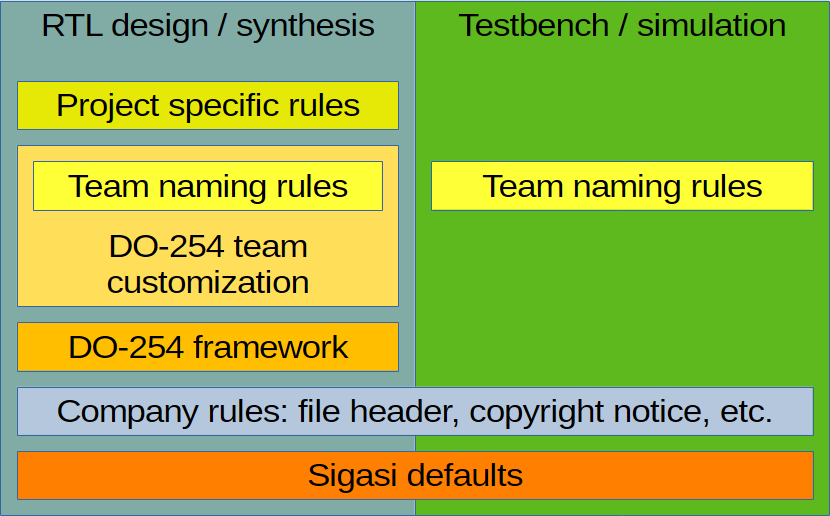
Instead of one large, unmanageable file, Sigasi enables a layered approach using @include.
{
    "@targets": {
        "synthesis": {
            "@include": [
                "DO_254_VHDL.jsonc",
                "DO_254_Verilog.jsonc",
                "team_rtl_customizations.jsonc",
                "project_specific_settings.jsonc"
            ]
        },
        "simulation": {
            "@include": [
                "team_naming_conventions.jsonc"
            ]
        }
    },
    "@include": [
      "company_header.jsonc"
    ]
}
This structure reflects how engineering organizations actually operate.
Key advantages:
- clear separation of responsibilities
- reusable configuration across projects
- controlled updates of standards (e.g., DO-254 revisions)
- easier review and governance
In an AI-assisted workflow, this layering becomes crucial. AI does not understand your organization’s rules unless they are enforced.
Sigasi makes those rules explicit, composable, and automatically applied.
Handling legacy or external IP
Not all RTL follows the same conventions.
Legacy IP or third-party blocks often use different naming schemes or coding styles. Refactoring them is costly and sometimes not allowed in regulated environments.
Sigasi allows localized overrides. You can configure Sigasi to apply the old naming conventions on the legacy or third-party IP block using the @override keyword in the settings file.
{
    "@include": [
        // These settings apply to the whole project
        "team_settings.jsonc",
        "project_specific_settings.jsonc"
    ],
    "@override": {
        "Design/legacy_ip": {
            // These settings apply to the legacy_ip folder, overriding project settings
            "@include": [
                "legacy_naming_conventions.jsonc"
            ]
        }
    }
}
This keeps:
- the main project consistent
- legacy code untouched
- validation accurate in context
As AI introduces more external or generated code into projects, this capability becomes essential. Not all code should be treated the same, but all code must still be validated correctly.
Managing shared settings at scale
The @include mechanism becomes even more powerful when combined with:
- environment variables
- shared repositories
- version-controlled configuration
Example:
{
    "@include": [
        // absolute path for team-specific settings
        "/home/my_team/sigasi/team_settings.jsonc",
        // environment variable points at company-specific settings
        "${COMPANY_SETTINGS_PATH}/sigasi_settings.jsonc",
        // project-specific settings
        "project_specific_settings.jsonc"
    ]
}
Or using repository structures (e.g., Git submodules):
{
    "@include": [
        // team-specific settings
        "../team_repo/sigasi_team_settings.jsonc",
        // company-specific settings
        "../company_repo/sigasi_settings.jsonc",
        // project-specific settings
        "project_specific_settings.jsonc"
    ]
}
This enables:
- centralized governance
- consistent rule enforcement across projects
- controlled evolution of coding standards
In other words, configuration becomes part of your engineering infrastructure.
Conclusion
Sigasi’s new enhanced settings management is not just about convenience. It is about control.
As RTL development evolves toward AI-assisted and higher-volume workflows, enforcing correctness at the front end becomes more important, not less.
AI can generate HDL fast, but LLM generated RTL is not trustworthy until it is validated in full project context. Sigasi provides that validation layer:
- deterministic
- project-aware
- scalable across teams and standards
This is how (large) teams keep RTL reviewable, reproducible, and ready for downstream tools no matter how it was created.
If you are scaling your RTL development, whether with larger teams, stricter standards, or AI-assisted workflows, the Sigasi configuration model becomes foundational.
See also
- Enabling DO-254 guideline checks in Sigasi SVH (knowledge)
- Enabling STARC rules in Sigasi SVH (knowledge)
- Use Case: Minimal Classic Project Setup (knowledge)
- Moving Sigasi Files Out of the Way (knowledge)
- Use Case, Mixed Language VUnit Project (knowledge)