In a previous post, “Generate VHDL Doxygen documentation in Sigasi”, I wrote about how you can use Doxygen in Sigasi to document your VHDL designs.
Doxygen tries to make the documentation process easier by extracting information from your VHDL source files. The biggest advantage is that there is only a single source for both your design and your documentation. While this gives no guarantee for the design staying in sync with the documentation, it certainly makes it easier.
But although I like the base idea of Doxygen, it has some annoying disadvantages:
- You need to add special comments to your VHDL code before any useful documentation can be generated
- Doxygen does not use a real VHDL compiler. So not all VHDL code is supported (e.g., VHDL 2008 features)
- A lot of work to set up: To create PDFs with basic diagrams, you do not only need to install Doxygen, but also DOT and LaTeX. Especially LaTeX can be a real challenge…
- The output can be confusing: “Inheritance diagram”? “The output for this class was generated …”? This terminology makes sense for C++ projects, but not for HDLs.
- Long feedback loop: the documentation for the entire project needs to be generated before you can inspect the result.
Sigasi documentation generator
For these reasons, we developed an alternative, based on Sigasi Studio’s internal VHDL analyzer. We stuck with the base idea, but followed a different approach to overcome the disadvantages.
The new Sigasi Studio documentation generator has following advantages:
- No special coding requirements: the plain comments in your code are extracted for the documentation. No need for special annotations. Sigasi Studio uses the same code/comment association as the hover provider (See “Comment Association”). So to document a
port, you append a comment to a port declaration. To document anarchitecture, you put the comment just on top of the architecture. - All included. All documentation processing is done in Sigasi Studio/Eclipse. So you do not need to install extra tools.
- Fully hyperlinked. If you export the documentation, you get a fully hyperlinked HTML document.
- Live preview: you can see what the documentation will look like while you type your code and comments.
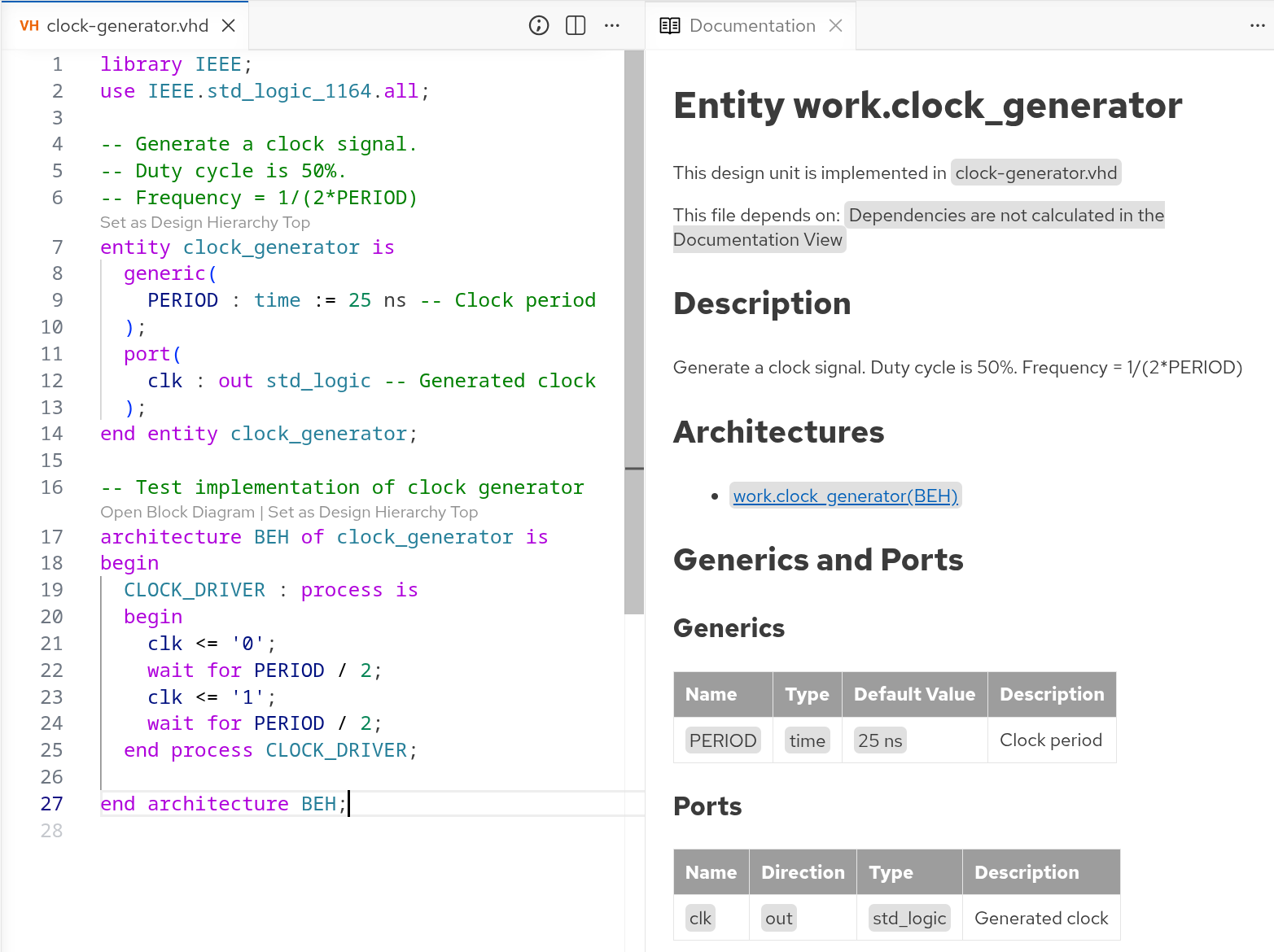
How does it work?
Sigasi creates the HTML document with your project’s documentation in multiple steps:
- Extract all relevant information (content, comments, etc.) from your project
- Generate all diagrams
- Generate an HTML document
- The diagrams can optionally be embedded in the generated document
The generated HTML document can be customized further, e.g., by applying a Word macro as explained in Convert HDL documentation to PDF or Word.
Conclusion
We developed an easy but powerful alternative for DoxyGen. It is very easy to get started with, and encourages good practices. So I invite you to try this out yourself. Even with a Sigasi Studio Starter license, you can open the Documentation Preview.
See also
- Customizing documentation from Sigasi Visual HDL: easier than you think (knowledge)
- Sigasi's Software Development Kit Part 2 (blog post)
- Sigasi's Software Development Kit Part 1 (blog post)
- Customize documentation from Sigasi Visual HDL using the Document Object Model (knowledge)
- Generate documentation in Sigasi Visual HDL (knowledge)